AI Overview Tracking: How to Check Your Own Exposure Now That Most Searches Show One
Check which of your keywords show a Google AI Overview and cite you, with a free 20-keyword method, what Search Console shows, and what to track next.
AI Overview tracking means checking which of your own keywords show a Google AI Overview, whether your site gets cited inside it, and what that does to your clicks. Everyone is quoting the same headline this week: AI Overviews now show on over 80% of Google searches. That number is real, but it's measured on someone else's keywords.
What matters for your business (or your client's) is your own share. In this post I'll show you a free 20-keyword check you can finish in an hour, what Search Console can and can't tell you, and what to track once you know your exposure. It works for a local business, a freelancer with a few clients, or an agency reporting across dozens.
What is AI Overview tracking?
AI Overview tracking is measuring three things on your own keywords: how often they trigger an AI Overview (trigger rate), how often you're cited inside it (citation rate), and what it does to your clicks. You check them on a fixed keyword list, date-stamp the results, and repeat.
It's one part of generative engine optimization, the work of getting your business named in AI answers. The difference is focus. GEO is about winning the citation. Tracking is about knowing where you stand before you spend time and money chasing it.
Two definitions keep the numbers honest:
- Trigger rate = keywords that showed an AI Overview, divided by keywords checked.
- Citation rate = keywords where your site is linked in the AI Overview, divided by keywords that showed one.

Do AI Overviews really show on 80% of Google searches?
On some trackers' keyword sets, yes, but the 80% figure is an average over someone else's keywords. The three trackers behind the headline counted different queries and sit about 20 points apart, so your own share could be well above or below it.
Search Engine Roundtable reported on October 26, 2026 that AI Overviews now show on over 80% of Google searches, up from 50% in June last year and about 15% the year before that. Barry Schwartz based that on recent data from Semrush, SE Ranking and seoClarity. Here's what each tracker actually counted, as broken down by Technical SEO News:
| Tracker | AI Overview figure | What it counted | When |
|---|---|---|---|
| Semrush Sensor | Over 80% | Its own tracked keyword panel, split by industry and query type | Reported Oct 26, 2026 |
| SE Ranking | 82.5% | US brand searches only | Reported Oct 26, 2026 |
| seoClarity | Over 62% (55% to 84% by industry) | Queries in general | About a month earlier |
See the problem? SE Ranking's 82.5% is brand searches and nothing else. seoClarity's 62% covers queries in general, and its own range runs from 55% to 84% depending on the industry. As Technical SEO News puts it, a coverage percentage is a property of the keyword list a tool samples, not a property of Google.
So when a client sends you the 80% headline, don't panic. Run the check on their keywords instead.
Can Google Search Console show your AI Overview data?
Partly. Search Console's Generative AI performance report shows your impressions in AI Overviews and AI Mode combined, by page, country, device and date, but no clicks and no query view. The main Performance report includes that traffic without labeling it.
Google announced the Generative AI performance reports on June 3, 2026 and rolled them out to all websites worldwide on August 31, 2026. The Search Console help page lists AI Overviews and AI Mode together in one report, with dimensions for pages, countries, dates and devices. There's no query tab, and impressions are the only metric.
The bigger catch is in the main Performance report, where most of us live. That AI traffic is already in there, mixed in with your blue links. As Lily Ray pointed out on October 26, Google doesn't label or filter AI Overview or AI Mode rows in that report.
Then there's position. Google's own impressions and position docs say an AI Overview occupies a single position, and every link inside it gets that same position. John Mueller confirmed Google tracks it "as a block" and called position "hard to do" in a useful way for these features. So a page can show an average position near 1 because it's cited in an AI Overview, while the clicks look nothing like a real number 1. Keep that in mind for the next two sections.
How do you check your own AI Overview exposure for free?
You run a 20-keyword check by hand. It takes an hour or so, costs nothing, and gives you a dated baseline you can repeat every month. Here's the process.
- Pick 20 money keywords. Not vanity terms. Use the searches that bring in work: your service, service + city, "near me" versions, comparisons (X vs Y, best X for Y) and a few branded searches. Freelancers and agencies, do this per client.
- Split branded and non-branded. Brand terms are close to saturated with AI Overviews, so a blended average hides which half is actually at risk. Technical SEO News makes this exact point, and I reckon it's the step most people skip.
- Search logged out, location set. Use a private window and the city your customers search from. AI Overviews vary by location and session, so keep the setup the same every time.
- Log every keyword. Use the columns in the table below. Screenshot any AI Overview where you're cited, with the date.
- Do the maths. Trigger rate = keywords with an AI Overview divided by keywords checked. Citation rate = keywords where you're cited divided by keywords with an AI Overview. Work them out for branded and non-branded separately, then for the whole list.
- Re-check monthly. On the trackers' panels, coverage went from 50% in June last year to over 80% now, so last quarter's baseline is already old.
| Column | What you write | Example |
|---|---|---|
| Keyword | The exact search | restaurant accounting nyc |
| Type | Branded or non-branded | Non-branded |
| Date and location | When and where you checked | Date, New York |
| AI Overview? | Yes or no | Yes |
| Cited? | Is your site linked inside it? | Yes, listed first |
| Who else is cited | The other sites in the answer | Competitor firms, directories |
| Notes | Anything worth acting on | Screenshot saved |
So what happens when you run it on a real site? We ran the check on airankingskool.com on October 27, 2026: 20 keywords, logged-out Google, US English results. The keywords were the topics this site writes about, plus one branded search and one keyword from a member case study.
| Result (airankingskool.com, Oct 27, 2026) | Count | Detail |
|---|---|---|
| Keywords checked | 20 | 19 non-branded, 1 branded |
| Showed an AI Overview (trigger rate) | 17 of 20 | 85% (all 17 were non-branded) |
| airankingskool.com cited in the AI Overview (citation rate) | 0 of 17 | 0% |
| No AI Overview | 3 | "local seo", "restaurant accounting nyc", "nico ai ranking" (branded) |
Yep, zero. Not cited in a single one of the 17 AI Overviews. A bit humbling for a site that teaches this stuff, mind you, but that's exactly why you run the check instead of assuming.
The more useful finding is where we already rank. The site shows up in the organic results for "website structure for seo", "seo site structure", "chatgpt personality" and "claude seo" (plus the branded "nico ai ranking"). All four non-branded ones had an AI Overview, and we weren't in any of them. Those are the pages to work on first, because Google already trusts them enough to rank them.
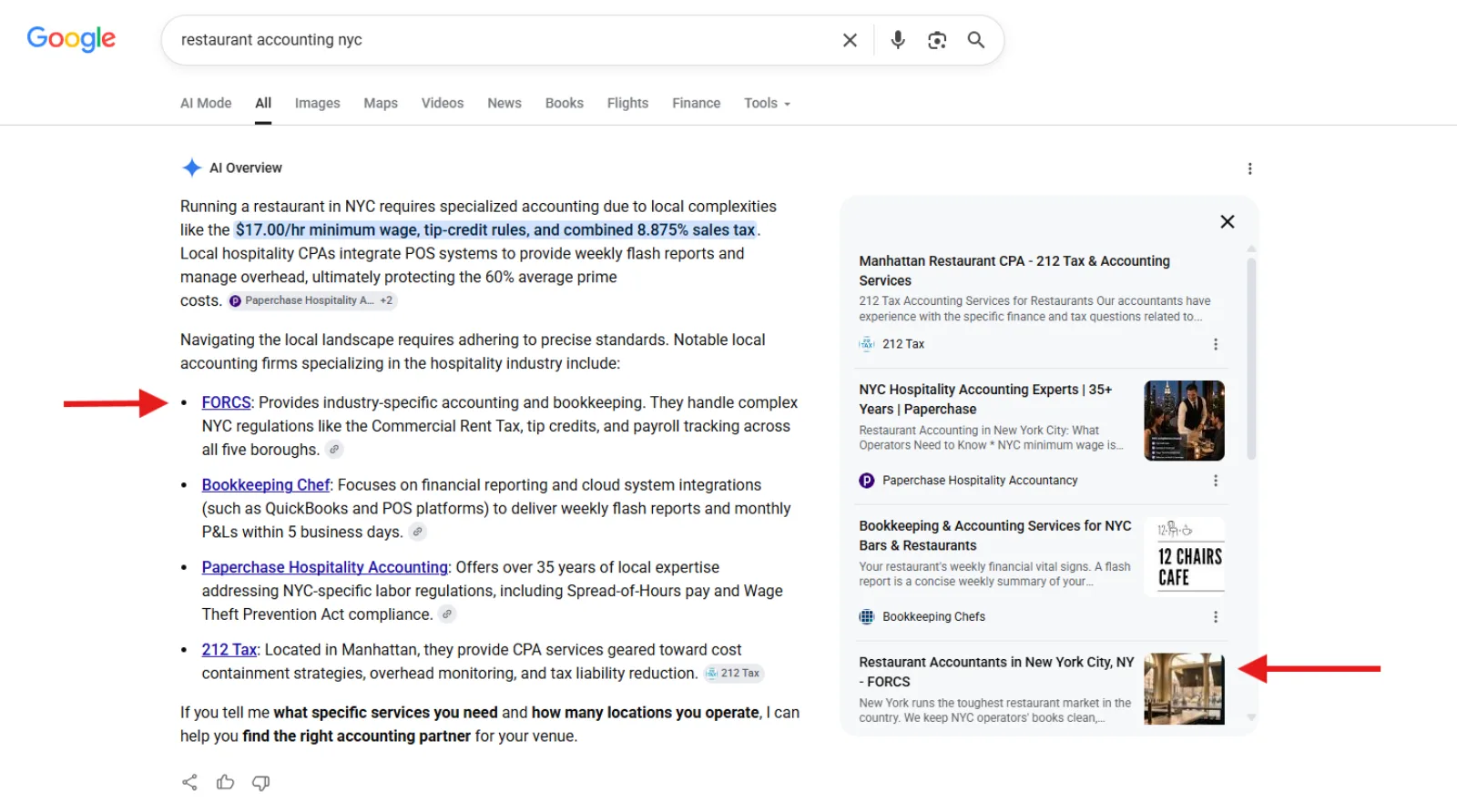
The log caught two more things an average never would. The AI Overview for "learn geo" was about geography, not generative engine optimization, so that keyword is the wrong target and comes off the list. And "restaurant accounting nyc" showed no AI Overview in this logged-out US check, even though the member's own screenshot from July shows one naming his firm first:
That's the honest limit of a hand check: it's a snapshot of one search, in one setup, on one day. AI Overviews come and go by location and session. That's why the date, the location and the monthly repeat matter more than any single result.
How do you spot AI Overview click loss in Search Console?
Search Console won't flag AI Overview click loss for you, but you can find the pattern. You're looking for queries where impressions and position hold steady (or even improve) while CTR drops. Here's how I'd run it.
- Open Performance, then Search results. Turn on all four metrics and compare two periods, for example the last 3 months against the same months last year.
- Filter out your brand, keep the questions. Exclude queries containing your brand name, then use a custom regex query filter for words like how, what, why, best, cost and vs.
- Sort by impressions and scan. Flag rows where position held or rose but CTR fell. That's the shape of an answer sitting above you, or of a citation reported at the AI Overview's block position.
- Cross-check the pages. Open the Generative AI report and look at its top pages. If a flagged query's page is there too, search the query by hand and screenshot what you see.
CTR moves for heaps of reasons (new ads, a better competitor title, seasonality). Only act on the pattern when it repeats across related queries and a manual search confirms the AI Overview.
What should a local business, freelancer or agency track?
Track AI Overview presence and citations on your money keywords, but judge it by conversions. Mentions and citations are great, but the only KPI that matters is conversions: calls, bookings, sales and signed clients.
A citation report full of green ticks means nothing if the phone doesn't ring. Start tracking citations and mentions with DataWise (or the free check above), but never lose focus on conversions. That's what makes the client happy and keeps them wanting more.
And mentions can turn into conversions fast. Tim Armstrong's client is closing a mortgage that came from a ChatGPT recommendation (the full story and screenshots are below). Here's how I'd split the work:
| Who | Which keywords | Which metrics | How often |
|---|---|---|---|
| Local business | Your service + city and "near me" money searches | Trigger rate, citation rate, then calls and bookings from those pages | Monthly |
| Freelancer | Each client's top 20 money keywords | Citation rate and mentions, reported next to the client's leads and sales | Monthly, in the client report |
| Agency | A per-client baseline, branded and non-branded split | Trigger and citation rate per client, conversions as the headline KPI | Monthly baseline, quarterly review |
For local businesses, the keywords that matter are mostly local ones, so build the list from the same service + city terms you'd use in your local SEO plan. For agencies, one more rule from Technical SEO News: when you quote a market figure to a client, name the tool, the query mix, the country and the date. A number without its panel invites a forecast nobody can defend later.
Which AI Overview tracker or checker should you use?
Start with the free manual check, add Search Console's Generative AI report for page-level impressions, then use a tracker once you need presence and citations logged automatically over time. Most owners need all three, in that order.
- Manual check (free): does this keyword show an AI Overview today, and am I in it?
- Search Console (free): which pages get impressions in AI Overviews and AI Mode. No queries, no clicks.
- A tracker: runs your list on a schedule and logs who gets cited, so you see the trend, not one snapshot.
I prefer DataWise, because it's our own tool and it comes free with membership. Its AI Search Visibility tracker checks your tracked queries across Google AI Mode, ChatGPT, Gemini and Perplexity, shows whether each answer cites or mentions you, and tracks it over time. To be clear about what it covers: those four engines, with Google's labeled as AI Mode. Use the manual check above for the classic AI Overview box.
Here's a real example from propiedadesaysen.com, a Patagonia real estate site, checked on Tuesday, October 27, 2026:
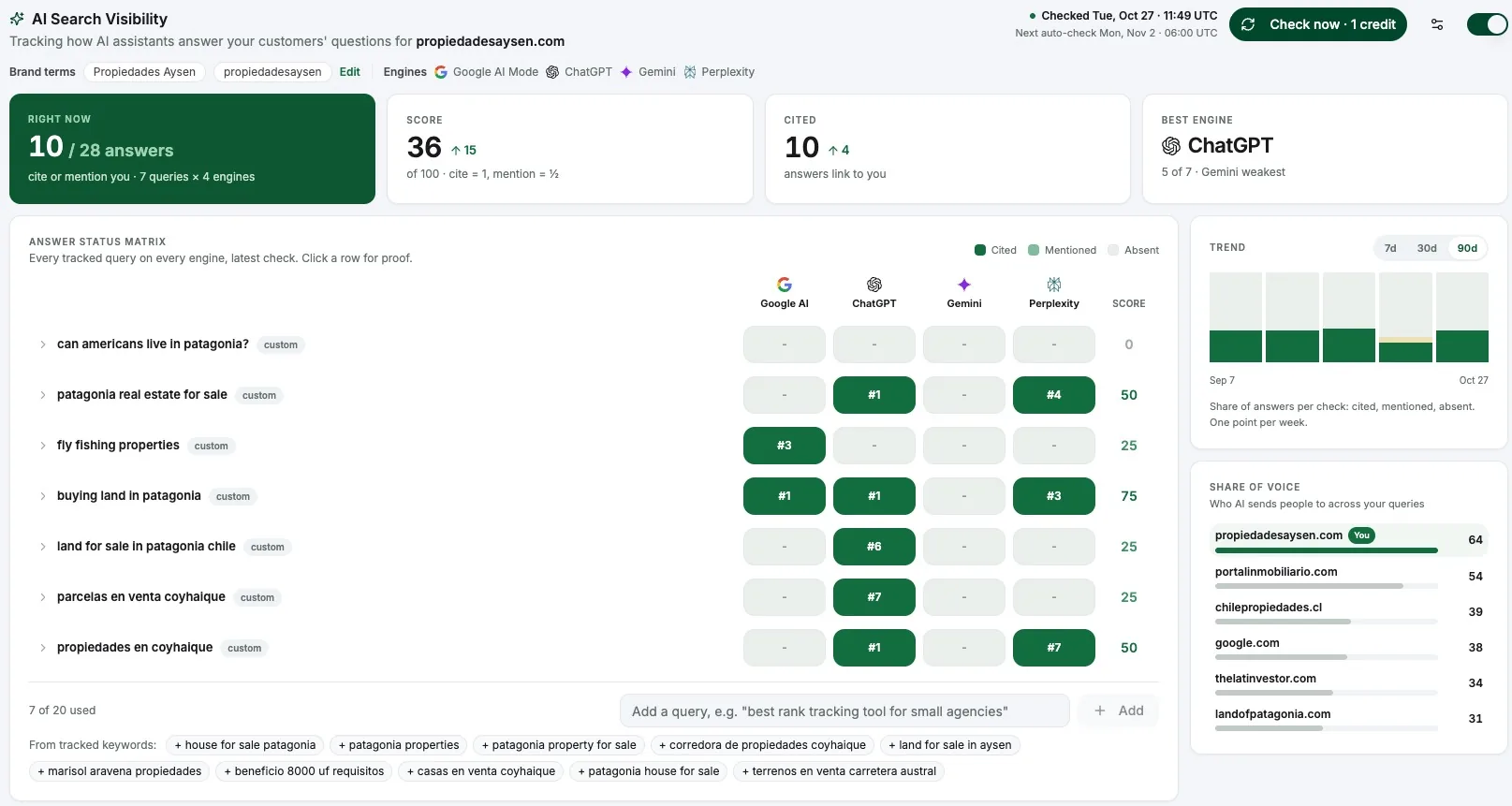
Across 7 queries and 4 engines, 10 of the 28 answers cite or mention the site. The visibility score is 36 out of 100 (up 15), and the site is cited in 10 answers (up 4). ChatGPT is the strongest engine at 5 of 7, and Gemini is the weakest. That tells you where to focus next, instead of guessing.
What do you do once you know your exposure?
Once your log has a month or two of data, sort every money keyword into one of three buckets:
- Defend: an AI Overview shows and you're cited. Keep the page fresh, accurate and easy to quote.
- Win: an AI Overview shows and you're not cited. These are your targets. Work through the AI Overviews ranking playbook on those pages.
- Stop chasing (for now): low-value keywords where a full answer sits on top and nobody needs to click. Spend that time on searches that convert.
This works in practice. In the FORCS case study, a member rebuilt a one-page site into proper service and area pages, and his July screenshot shows Google's AI Overview naming the firm first for "restaurant accounting nyc". (Our October check didn't get an AI Overview for that search, which is exactly why you keep re-checking.) Arlen Jenks, another member, got a client featured in an AI Overview, plus 5x on page 1.
And here's why I keep banging on about conversions. Tim Armstrong posted this in our Skool wins in October 2025, after checking in with a client to make sure he knew the SEO work was getting him recommended in ChatGPT:
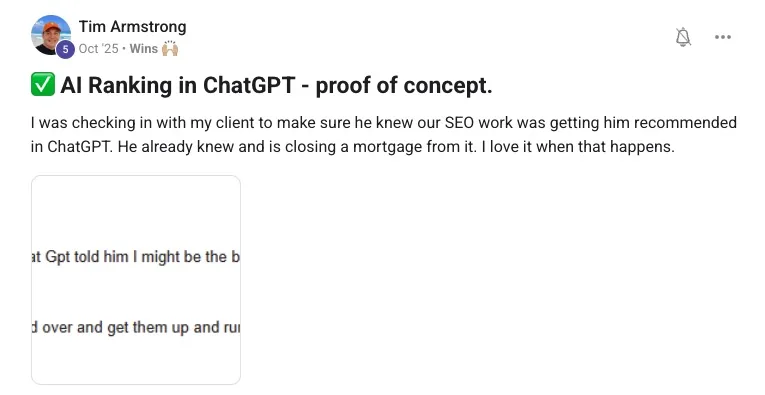
The client already knew. He was closing a mortgage from it. Here's the message the client sent Tim:
"A guy came in the other day retired and he said Chat Gpt told him I might be the best option in America for him.. We are closing him tomorrow."
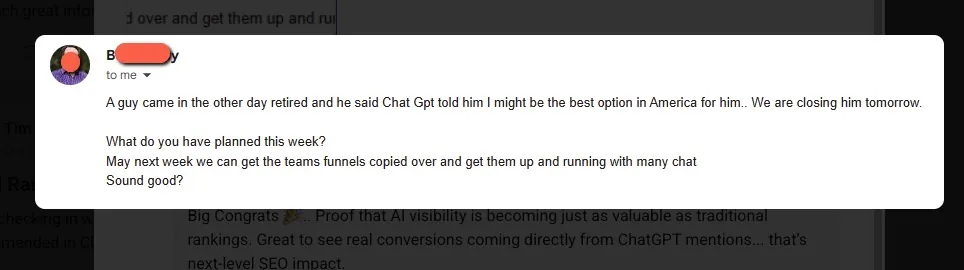
That's a citation turning into a closed deal, and it's what your tracking should point at.
So start this week. Pull your 20 money keywords, run the check, and date-stamp it. Run it again next month. If you want help with the next step, the AI Ranking community has the playbooks, live Q&As and DataWise included. Join AI Ranking on Skool and post your baseline in the community. I'd love to see it.
Cheers,
Nico