Grok Agents for SEO: How I Built a Team of Grok Bots That Research, Write and Publish My Blog
Grok agents are Bots in Grok Bot that can research, brief and draft SEO content for your site or clients'. Here's my real four-Bot setup, with every publish approved by me.
Grok agents are the Bots inside Grok Bot: named AI teammates with a job, their own memory and a shared cloud computer to work on. I run four of them on this blog. In this post I'll show you how a small team of Grok agents handles SEO research, briefs, drafts and staged publishing, with me approving every publish.
The same setup works for your own site or for client sites, so if you're a freelancer or run an agency, every section has the client angle too. No hype. Just the setup, the real data and the gaps I still have to fill.
What are Grok Bot agents?
Grok Bot agents are Bots: AI teammates with a name, a job and context that builds over time. Each one works on a persistent cloud computer with a browser, files and a terminal, so the work lands in real tools instead of a chat window.
That's how the official Grok Bot docs describe them. You message a Bot like a coworker, give it the task and the context, and it comes back when something needs your approval. Closing your laptop doesn't stop it, because the work runs on the cloud computer.
The memory part matters for SEO. A Bot keeps stable preferences, role context and summaries of past work, but the docs are clear that memory isn't an authoritative source. So for anything that touches rankings or numbers, tell the Bot to reopen the live data. Don't let it guess from last week.
Here's the thing: a Bot that keeps working while you sleep is great for research. It's also exactly why you want firm rules before one goes near a live website.
Does Grok use agents now?
Yes. Grok Bot gives you persistent agents (Bots) that work across apps, Grok Automations runs scheduled or email-triggered jobs on grok.com, and Grok Build is a coding agent for your terminal.
Three products, three jobs, and they're easy to mix up. One term first: MCP (Model Context Protocol) is an open standard that lets AI assistants use outside tools and data. It's how an agent reads your SEO data instead of making it up. Here's how the three compare for SEO work, based only on the official pages.
| Grok Bot (Bots) | Grok Automations | Grok Build | |
|---|---|---|---|
| What it is | Named AI teammates with a job, memory and a shared cloud computer | Jobs Grok runs on its own after you describe them once | A coding agent |
| Where it runs | A persistent cloud computer, used from the desktop app (macOS, Windows, Linux) and the iOS and Android apps | grok.com and the Grok app on iOS and Android | Your terminal, or headless in scripts |
| MCP and connectors | Connectors installed from Connect apps, attached in chat with @ | Connectors and skills added to the instructions | MCP servers, plugins and hooks |
| Runs on a schedule? | Yes: routines run on a schedule or, where supported, after an event | Yes: once, daily, weekdays, weekly, monthly or yearly, or when a matching email arrives | Headless mode for your own scripts and CI/CD pipelines |
| Best SEO use | Multi-step work: research, briefs, drafts and staged publishing behind approval | A recurring digest, like a morning SEO brief | Editing your site's code and templates |
The Grok Bot column comes from the official Grok Bot overview and the skills and routines page. A skill is a reusable set of instructions. A routine tells one Bot when to run a workflow.
Automations in Grok run on a schedule or an email trigger, and every run is saved as a full conversation you can reopen. If older guides told you about Grok Tasks, the old grok.com/tasks address now redirects to the Automations page.
Grok Build is a coding agent you use in a terminal or headless in scripts, and it picks up skills, plugins and MCP servers. Great if you or your developer edit the site's code. Overkill if you just want content and research.
What can I do with a Grok Bot for SEO?
You can hand a Grok Bot the multi-step prep work of SEO: pulling Search Console and keyword data, writing briefs, drafting posts and staging them for review. It works for your own site or a client's, as long as a human approves what goes live.
The docs say a Bot takes on multi-step work across apps and websites. It uses connectors where they exist and the browser for everything else. The Grok Bot FAQ adds that a connector is the more reliable route when one is available, which is why my research Bot reads SEO data through one.
On your own site, good first jobs look like this:
- A weekly Search Console pull with the queries and pages that moved
- A brief for the next post, with keyword data and real People Also Ask questions
- A first draft in your voice, plus a title and meta description
- A staged copy of the post for you to check before it goes live
On client sites, the work is the same but the setup needs more care. You can duplicate a Bot for a different scope: the copy keeps the profile, skills and routines but not the conversation history or learned memory. Then give each client its own folder in the shared workspace.
One catch for agencies: every Bot on your account shares the same computer, so a client login one Bot uses is open to all of them. More on that in the safety section below.
How do I set up a team of Grok agents for SEO?
Here's my actual setup: four Bots, one shared folder and one group chat. You don't need four on day one. The docs say to start with the smallest useful roster and add a Bot only when a job has a stable specialist role.
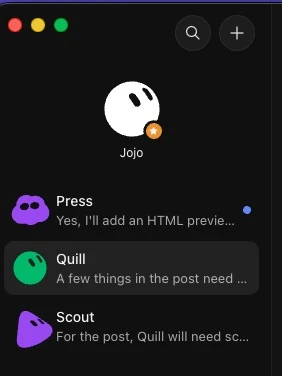
- Give each Bot one job. Scout does research and writes briefs. Quill writes. Press publishes to staging. Jojo coordinates the blog team. The docs suggest a separate Bot when the work has its own goal, tools and approval boundary, and putting lasting rules in the description while task details stay in the chat.
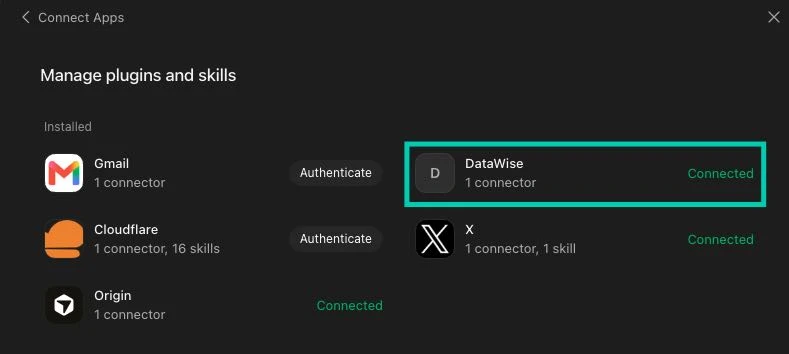
- Connect real data. Scout pulls live data through the DataWise MCP connector: Search Console, keyword metrics, People Also Ask and AI mentions. DataWise is our own SEO tool. Connectors are installed from Connect apps in the sidebar. If the plumbing is new to you, here's how MCP connectors work.
- Hand off through files, not memory. My Bots don't share memory, so they pass work through files in a shared folder and short @mentions in a group chat. A group chat holds two to six Bots, and Bot-to-group handoff messages are text-only. A file path travels fine. A whole draft pasted into chat doesn't.
- Set the approval boundary. For now, Press pushes to a staging site, and I approve each publish before it goes live. One detail most guides skip: approval requests don't appear in a group chat, so Press's approval card shows up in its own chat.
My team runs on four rules. The writer never publishes. Nothing gets invented. Bots get at most one back-and-forth on an item before they ask me. And I approve every publish.
Doing this for clients? Same four rules, one folder per client, and a duplicated Bot when a client's tools differ.
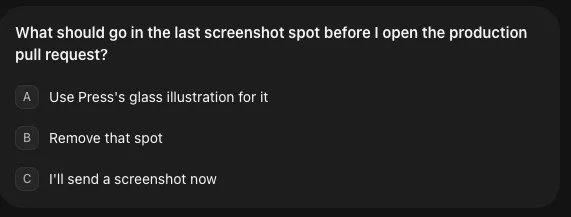
Here's what a handoff through Jojo, my coordinator, looks like. I give one instruction, Jojo messages the other Bots, and when there's a choice to make, it comes back to me.
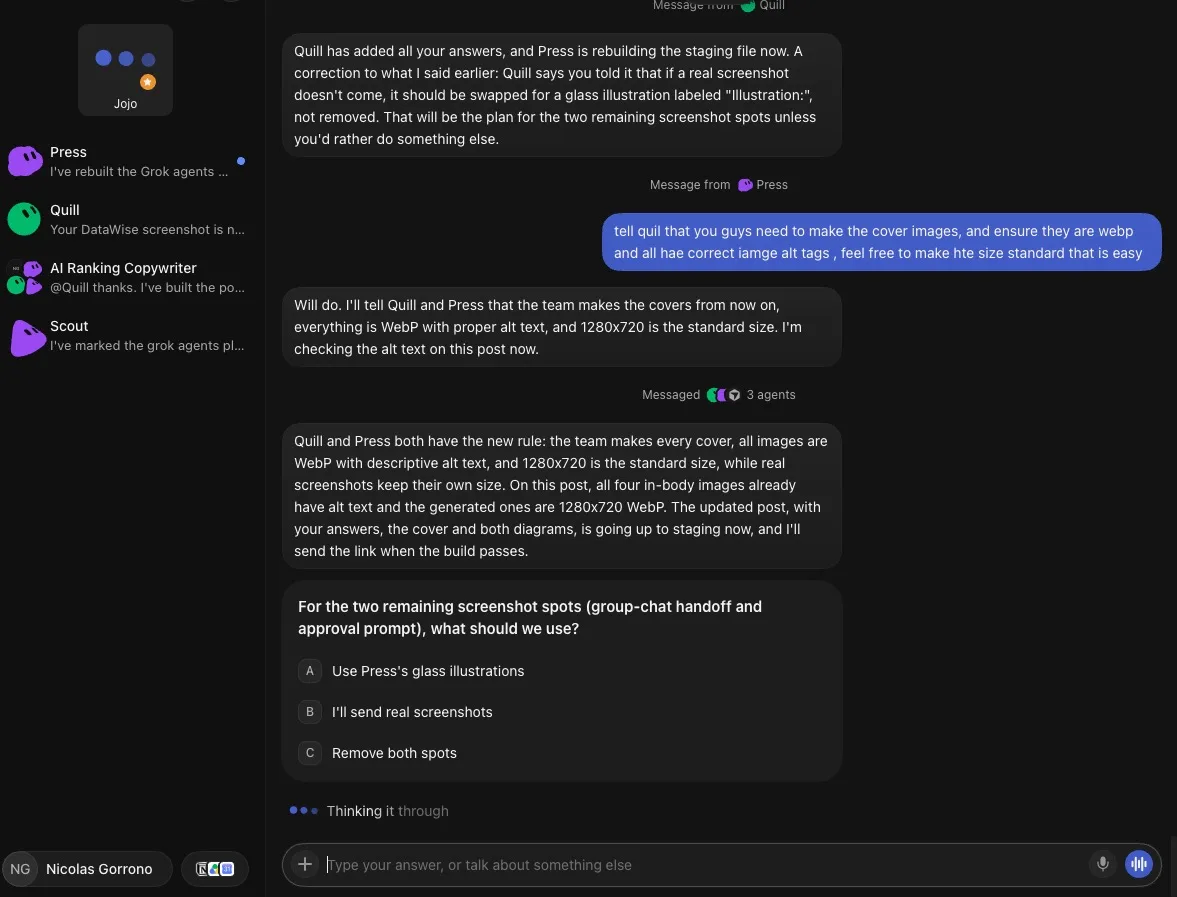
And nothing goes to production without my say. Before Jojo opened the production pull request for this post, it stopped and asked me how to finish the last open spot.
Can AI automate keyword research workflows?
Mostly, yes. The brief behind this post is my team's first real output, so here's that run, warts and all. Scout pulled everything through DataWise on October 20, 2026 (US data): Search Console, metrics for 110 keywords, People Also Ask, ranked keywords and AI mentions. Then it wrote the brief.
Here's what it found:
- The obvious keywords were empty. "grok seo", "grok bot seo", "grok for seo", "seo with grok" and "how to use grok for seo" all showed 0 searches a month.
- "grok agents" had the demand: 590 searches a month at keyword difficulty 2. "grok agent" had 480 at difficulty 16.
- We had no footprint. Our Search Console had 0 queries containing "grok", and none of the 165 URLs in our sitemap was about Grok.
- AI engines barely mention us yet. In DataWise's AI mentions data for Google AI, x.ai had 1,785 domain mentions and airankingskool.com had 19. On ChatGPT it was 373 to 0.
That's why this post targets "grok agents" and not "grok seo". If I'd guessed, I'd have picked a keyword nobody searches. The 80/20 here: the Bot pulls the numbers, you make the call.
The useful part was what Scout flagged instead of faking. Our AI visibility tracker didn't cover any Grok or agent queries, so it reported that topic-level citation data didn't exist yet. The Search Console tool offers 7, 14, 30 or 90 days, so it used 30 days and said so. And with no repo access, it checked the slug against the live site and asked Press to confirm the file later.

For a client, the process doesn't change. Only the property, the keyword list and the person who signs off do. If you'd rather work in OpenAI's tools, I've also written up the same SEO jobs in Codex.
The whole run, from Scout starting the research to the finished brief, took roughly 20 to 25 minutes.
What did I fix by hand? Mostly my tone of voice and my own experience. I also asked for a few tables and diagrams, because they add value and explain the point better than more paragraphs.
The Bots flagged their own gaps, too. They told me where a section needed more of my own experience. And they were careful with citations: when they couldn't find a source, they flagged it instead of faking one.
Which SEO tasks should Grok agents handle, and which stay human?
Grok agents should handle the preparation: data pulls, keyword checks, briefs, first drafts and staging. Humans keep the judgment calls, the real experience and the final yes on anything that goes live.
That split isn't just my opinion. The routine guide says to automate preparation before execution and to require approval for sending, deleting or publishing. The security page says to start with read-only tasks and draft outputs.
Hand these to the Bots:
- Search Console and keyword data pulls
- People Also Ask and gap checks for a brief
- First drafts, titles and meta descriptions
- Pushing a finished post to staging
Keep these yourself:
- Picking the keyword after seeing the data
- Your real experience, screenshots and results
- The final yes on publishing
- Anything that reaches a client, since sending is on the approval list too
AI is for scale, not replacement, and nobody needs more AI-regenerated slop. If you want the wider view, here's what to automate and what to keep human across your whole SEO workflow.
How safe is Grok Bot with your website and client data?
Grok Bot can stop for your approval on risky actions and hands password and two-factor steps back to you. But all your Bots share one computer, so separate Bots aren't a security wall for your site or client data.
The controls are real. You can set Ask first rules, and an approval card lets you Allow once, Always allow or Deny. For passwords, two-factor codes and CAPTCHAs, the Bot hands you control of the computer instead of asking you to paste them in chat.
Two details matter for publishing. An approval doesn't reverse work already done. And a card from work that started without you, such as a message from another Bot, expires after about 10 minutes and the action doesn't run, per the same security page. Miss Press's card and nothing publishes. You just ask it to try again.
The shared computer is the part to respect. Files, browser sessions and command-line credentials are available across your whole roster, and the FAQ says plainly not to use separate Bots as a security boundary. That's why my writer Bot never gets publish rights. For client work, the security page says to sign out of services when a job ends, remove sensitive files and revoke connectors you no longer need.
On privacy, Grok Bot uses your Cursor account's data settings, and training opt-out follows those settings. It needs cloud data storage, so Legacy Privacy Mode isn't supported, per the same FAQ.

Is Grok a good AI agent for SEO?
My honest verdict so far: it's been great. It feels a lot faster than Hermes (depending on the agent) and a little faster than Dots, OpenAI's new AI agent. But it does feel that it's going to use up a lot of credits.
That credit worry has a real basis. Grok Bot usage draws from a shared weekly pool that also covers Grok and Cursor. The routine guide also warns that broad listeners consume usage, so keep your triggers narrow and your jobs scoped.
On cost, Grok Bot is included with eligible plans. On The X Subscription that means Premium, Super and Ultra, not Free or Plus. The FAQ says it also comes with paid individual Cursor plans and Cursor Teams, or a linked SuperGrok subscription. There's a 7-day free trial, and as far as I can see, the first month is 50% off right now.
The limits are worth knowing. Memory drifts, so Bots need live data. Websites can still block automation or ask for a human step. And you still review every output.
Where does it fit? If you want to code your own stack, here's how to build your own SEO agent setup with Claude Code. If you want an always-on open-source agent on your own machine, Hermes is the other route. Grok Bot is the one where setup is a message and the Bots coordinate with each other.
Whichever you pick, fundamentals still rule. A post from a Bot team ranks like any other post: results typically take 7 days to 3 months, depending on your niche. And for GEO (generative engine optimization, getting cited by ChatGPT, Perplexity and Google AI Overviews), be wary of anyone promising AI citations in 48 hours. Nobody controls that.
If you want to build a team like this for your own site or your clients, with people doing the same thing, join the AI Ranking community. Bring your setup and we'll help you tighten it.