Claude SEO Skills: What They Are, Which to Install, and How to Feed Them Real Data
Claude SEO skills explained: what they are, three free skill sets compared, how to install one, and why they need your real SEO data to be useful.

Installing Claude SEO skills is the easy part. Getting a useful answer out of them depends on what data Claude can actually see. GitHub is full of SEO skill sets for Claude with dozens of commands each, and two of the three below call themselves the most comprehensive. None of them compares itself to the others, and few spell out what you lose without real data behind them.
This post fixes that. You'll get three free skill sets side by side, install steps for claude.ai and Claude Code, the safety checks to run first, and how to build your own. It's written for business owners, freelancers and agencies, not just developers.
What are Claude SEO skills?
Claude SEO skills are folders of instructions, built around a SKILL.md file, that teach Claude to run an SEO job (an audit, keyword research, a report) the same way every time. Claude only loads a skill when your request matches its description.
Anthropic's Claude Code docs describe a skill as a SKILL.md file with instructions that Claude adds to its toolkit and uses when relevant, or that you run directly by typing /skill-name. The file has two parts: a short header (the frontmatter) with a name and a description of when to use it, and the step-by-step instructions underneath.
The clever bit is how they load. Per Anthropic's Agent Skills overview, only the name and description sit in Claude's context at the start, at about 100 tokens per skill. The full instructions load when a task triggers the skill, and any extra files or scripts load only when they're needed. That's why you can install heaps of skills without slowing every chat down.
Instead of pasting the same audit checklist into a chat every week, you write it once and Claude follows it. Skills are one of the four main ways of using Claude for SEO.
What's the difference between a Claude skill, an agent, a prompt and an MCP server?
A prompt is a one-off instruction, a skill is a saved process Claude loads when it fits, an agent is a worker with its own tools and context, and an MCP server is the connection that brings in outside data. Good SEO setups use all four together.
The cleanest way to think about it: the skill is the recipe, MCP is the pantry, and the agent is the cook. Anthropic's overview puts the prompt difference plainly: prompts are conversation-level instructions for one-off tasks, while skills load on demand so you don't repeat yourself. And Anthropic's guide to creating skills is just as clear on data: live data from another service is what an MCP connector provides. A skill can tell Claude how to use a connector, but it can't reach the service itself.
| Thing | What it is | What it's good for | SEO example |
|---|---|---|---|
| Prompt | An instruction you type into one chat | Quick, one-off jobs | "Rewrite this title tag under 60 characters" |
| Skill | A saved folder with a SKILL.md, loaded when a request matches | Repeatable processes you want done the same way every time | A weekly striking-distance check or a fixed audit checklist |
| Agent (subagent) | A worker with its own instructions, tools and context window | Bigger or parallel jobs, so the main chat stays clean | One agent audits schema while another checks page speed |
| MCP server | A connection between Claude and an outside tool or data source | Real numbers instead of guesses | Search Console, GA4 or keyword data pulled into the chat |
The SEO skill sets below mix these: skills plus specialist subagents, often with an MCP connection. For the agent side in more depth, our guide to AI agents for SEO work covers it, and there's a plain-English explainer on the Model Context Protocol too.
Which Claude SEO skills are worth installing?
Four Claude SEO skill sets worth comparing are AgriciDaniel/claude-seo for full audits, lionkiii/claude-seo-skills for Ahrefs and Search Console work, 01clauding/claude-seo-skill for a broad keyword-to-report workflow, and NicoSKOOL/jev-internal-links for missing internal links decided by TypeSafe's Jev model. Pick by the data you already have, not the command count.
Here's what each says about itself in its own README, read on October 28, 2026. The first three are community repos; jev-internal-links is one I built. All four are MIT licensed, and the counts are theirs, not ours.
| Skill set | What it covers | Data it needs | Install path | Cost |
|---|---|---|---|---|
| AgriciDaniel/claude-seo | Full-site and single-page audits: technical, content and E-E-A-T, schema, AI search, local, e-commerce, international. 26 sub-skills and 19 agents. | None to start. Optional free Google APIs (PageSpeed, CrUX, Search Console, GA4) and optional paid extensions. | Claude Code plugin (3 commands), or a manual install script. Needs Python 3.11 to 3.14. | Free (MIT). Uses your Claude Code plan, and a full audit uses more of it. |
| lionkiii/claude-seo-skills | 52 commands: audits, Ahrefs backlinks and keywords, Search Console analysis, SERP research, content briefs, AI search checks. | Ahrefs MCP listed as required. Search Console MCP optional (9 commands need it). | Claude Code plugin or install script. A separate Projects version for Claude Desktop and claude.ai. | Free (MIT). Ahrefs access is on you. |
| 01clauding/claude-seo-skill | 25 skills: keyword research, content briefs, an 80-rule audit, AI search, backlinks, rank tracking, local, reports. | Includes a skill for DataForSEO, Search Console and GA4 APIs. | Copy the skill folders into ~/.claude/skills/, or a one-line script. Also lists Cursor and other tools. | Free (MIT). |
| NicoSKOOL/jev-internal-links | Finds missing internal links: crawls your site, asks TypeSafe's Jev model which page each paragraph should link to next, applies your caps and confidence rules, then hands you an interactive report to approve. | OpenRouter API key (Jev + a small local shortlist model). About $1 per mid-size site run. | Claude Code skill: clone into ~/.claude/skills/jev-internal-links and install Python deps. | Free (MIT). Model calls are pay-as-you-go via OpenRouter. |
The claude-seo README says it works with no API keys. It's the most recently updated of the three on GitHub (October 22, 2026), and it runs five of its agents on Opus, so a full audit eats more of your plan than a single-page check.
The claude-seo-skills README is the most data-hungry. It lists the Ahrefs MCP as required, so it suits you best if you already use Ahrefs. It's also the only one with a no-terminal option: a Projects setup for Claude Desktop and claude.ai, where you paste instructions and upload reference files.
The claude-seo-skill README runs from keyword research through to reports. Its last commit was in March 2026, and its install commands still point at an older GitHub username (leofankm) that now redirects to it, so check you're cloning the repo you meant to.
I've run AgriciDaniel/claude-seo myself, and my verdict is simple: it's good, but only as good as the data it can access. I reckon that goes for most SEO skills, unless all they do is check on-site SEO, and even then they need the right crawlers. For keyword research, backlink analysis or anything else that needs data, if you don't connect Claude to an SEO dataset like the DataWise MCP, Claude is guessing. I haven't run the other two, so I won't pretend to have a verdict on them.
Some SEO tool vendors publish their own Claude skills too. Before you install one, check which data source it expects, because a skill built around a tool you don't pay for won't get you far.
How do you install a Claude skill in Claude Code, Claude Desktop or claude.ai?
There are two paths. If you don't use a terminal, upload a skill as a ZIP in claude.ai or the Claude desktop app. If you use Claude Code, install a plugin from a marketplace or copy the skill folder into your skills directory. Here's each one, non-technical path first.
How do you add a skill in claude.ai or the Claude desktop app?
Anthropic's help article on using skills in Claude lists skills on Free, Pro, Max, Team and Enterprise plans, as long as code execution is turned on.
- Turn on code execution. On Free, Pro or Max, go to Settings > Capabilities and switch on "Code execution and file creation" (called "Create and edit files" in the newer settings layout). On Team or Enterprise, an owner enables it under Organization settings > Plugins & skills, in the Policy tab.
- Get the skill as a ZIP. The ZIP has to contain the skill folder itself, with SKILL.md inside it. Anthropic's guide notes that a SKILL.md sitting loose at the root of the ZIP isn't recognized as a skill.
- Upload it. Go to Customize > Skills, click "+", then "+ Create skill", then "Upload a skill", and pick the ZIP.
- Switch it on and test it. Toggle the skill on, then send a prompt that matches its description. If Claude ignores it, ask for it by name ("use my weekly SEO check skill").
One catch. The SEO skill sets above are built for Claude Code: dozens of skills plus agents and scripts, not a single ZIP you can upload. claude.ai uploads also accept only a few header fields (name, description, license, compatibility, metadata and allowed-tools), and per the Claude Code skills docs any other field makes the upload fail. So if you're not technical, start with a single, simple skill, or a set that offers a desktop version.
How do you install a skill in Claude Code?
- From a plugin marketplace. Inside Claude Code, run
/plugin marketplace add owner/repo, then/plugin install plugin-name@marketplace-name. Each repo's README gives you the exact names. Anthropic's plugin docs say the install command opens a details pane first, so you can see what it adds and choose a scope before anything installs. - Or copy the folder. Put the skill folder in
~/.claude/skills/to use it in every project on your machine, or in a project's.claude/skills/folder to use it in that project only. Commit that folder and your team gets it too. - Check it loaded. Ask "What skills are available?", or type
/and the skill's name to run it directly.
Already using skills in claude.ai? The Claude Code docs say skills enabled on your claude.ai account sync to Claude Code in your terminal when you sign in with that account (version 2.1.273 or later).
Do Claude SEO skills work without real SEO data?
They run, but without Search Console, analytics or keyword data, a Claude SEO skill can only work from what it can read on the page plus estimates. Connect real data first, then let the skill decide what to do with it.
Anthropic's own guide says a skill can't reach the service itself: live data comes from a connector. A skill without a connection is a good checklist with nothing to check against. Otherwise, this thing is guessing, and that's not what you want.
The skill sets above are upfront about it, mind you. The claude-seo README says that without Google API keys, Core Web Vitals are lab estimates and indexing is inferred from the page. The claude-seo-skills README lists Ahrefs as required and shows a setup prompt for its Search Console commands when that connection is missing. An audit that can't see your real impressions can't tell you which pages are close to page one, or which ones lost traffic last month.

So connect your data before you judge any skill. We have a full walkthrough on how to connect Claude to your SEO data through MCP. AI Ranking members get DataWise, our own SEO tool, with their membership, and Claude can use it through the DataWise MCP connector, so your skills pull real data instead of estimating.
Once it's connected, Claude gets two groups of DataWise tools:
- Market and competitor data: keyword research and keyword metrics (volume, CPC, difficulty and intent), domain overviews, the keywords any domain ranks for, organic competitors, keyword gaps between two domains, backlinks and referring domains, how often a domain is mentioned or cited in AI answers, People Also Ask questions, and Google Business Profile reviews.
- Your own DataWise data: your rank tracking history, your AI Visibility tracker (share of voice by AI engine), your connected Search Console properties and queries, and Google Business Profile audits for your Local Pack projects. These read data already in your account, so there's no DataForSEO cost behind them.
Is it safe to install a third-party SEO skill?
It's as safe as the code and instructions inside it, so treat a third-party skill like software you're installing. Read SKILL.md and every bundled script first, keep API keys out of skill files, and only install from sources you trust.
Anthropic is blunt about this. Its overview says to use skills only from trusted sources, and warns that a malicious skill could call tools or run code in ways that don't match its stated purpose, including leaking data. Plugins go further: Anthropic's plugin security page says a plugin can execute arbitrary code on your machine with your user privileges, and that auto-updates can change the files you reviewed.
Here's a short checklist before you install anything:
- Read every file. SKILL.md, scripts, and anything it tells Claude to download. Anthropic's help article says to pay attention to code dependencies and instructions that connect to untrusted external sources.
- Read the install script before you run it. One of the READMEs above offers a one-line script piped straight into bash. Another shows a safer pattern: download the script, read it, then run it.
- Check the allowed-tools line. A skill can pre-approve tools for itself. The Claude Code docs say to review the allowed-tools of skills checked into a repository before you run Claude Code there.
- Keep API keys out of skills. Anthropic's guide says not to put credentials anywhere in a skill, because everyone you share it with gets its files. Use a connector so each person signs in with their own account.
- Try it on your own site first. Run it on a site you own before you point it at a client's.
How do you build your own SEO skill?
You need one folder, one SKILL.md file and a clear sentence about the job. Here's the order, based on Anthropic's guide to creating custom skills.
- Write the job in one sentence. Say what the task is and what a good result looks like. That sentence becomes your description, and the rest becomes the instructions.
- Name the folder. Lowercase letters, numbers and hyphens only, up to 64 characters, and it must match the
namefield. The Agent Skills overview also bans the reserved words "anthropic" and "claude" in a name, soclaude-seo-auditwon't fly. Call itseo-auditinstead. - Write the description. Say what it does and when to use it, using the words you'd actually type. Anthropic's docs allow up to 1,024 characters, but the description is the only part Claude reads before deciding to load the skill, so tight beats long.
- Write the steps. Keep SKILL.md under 500 lines. Move long reference material into a
references/folder, templates intoassets/, and code intoscripts/, and mention each file at the step where Claude needs it. - Test it. In Claude Code, copy the folder into
~/.claude/skills/and ask for the task. In claude.ai, zip the folder and upload it. Anthropic'sskill-creatorskill can then run your skill against test prompts to check it actually improves the output.
Here's a real one I built and use, called backlink-finder. This is its exact frontmatter:
---
name: backlink-finder
description: >
  Use when someone wants backlinks, link building,
  link prospects, outreach targets, guest post or
  "best of" list opportunities for their website,
  or asks to run their weekly backlink check. Finds
  sites that link to competitors but not to them,
  plus roundup, guest post, interview and resource
  pages in their niche, verifies every prospect with
  real DataWise data and a live page check, then
  saves one personalised outreach email per prospect
  as a Gmail draft. The user reviews and sends.
  Requires the DataWise SEO connector and the Gmail
  connector in the Claude desktop app.
---
In plain English: it finds verified link prospects using DataWise data plus a live check of every page, then saves the outreach emails as Gmail drafts only. It never sends anything. You read the drafts and press send. It needs the DataWise and Gmail connectors switched on in the Claude desktop app.
Notice the description is longer than one sentence. Every extra phrase earns its place: it lists the words people actually type when they want links (backlinks, link building, guest posts, "best of" lists), so Claude loads the skill whichever way you ask. The steps underneath tell it to check both connectors first and to stop if DataWise isn't connected, so it never makes up a number.
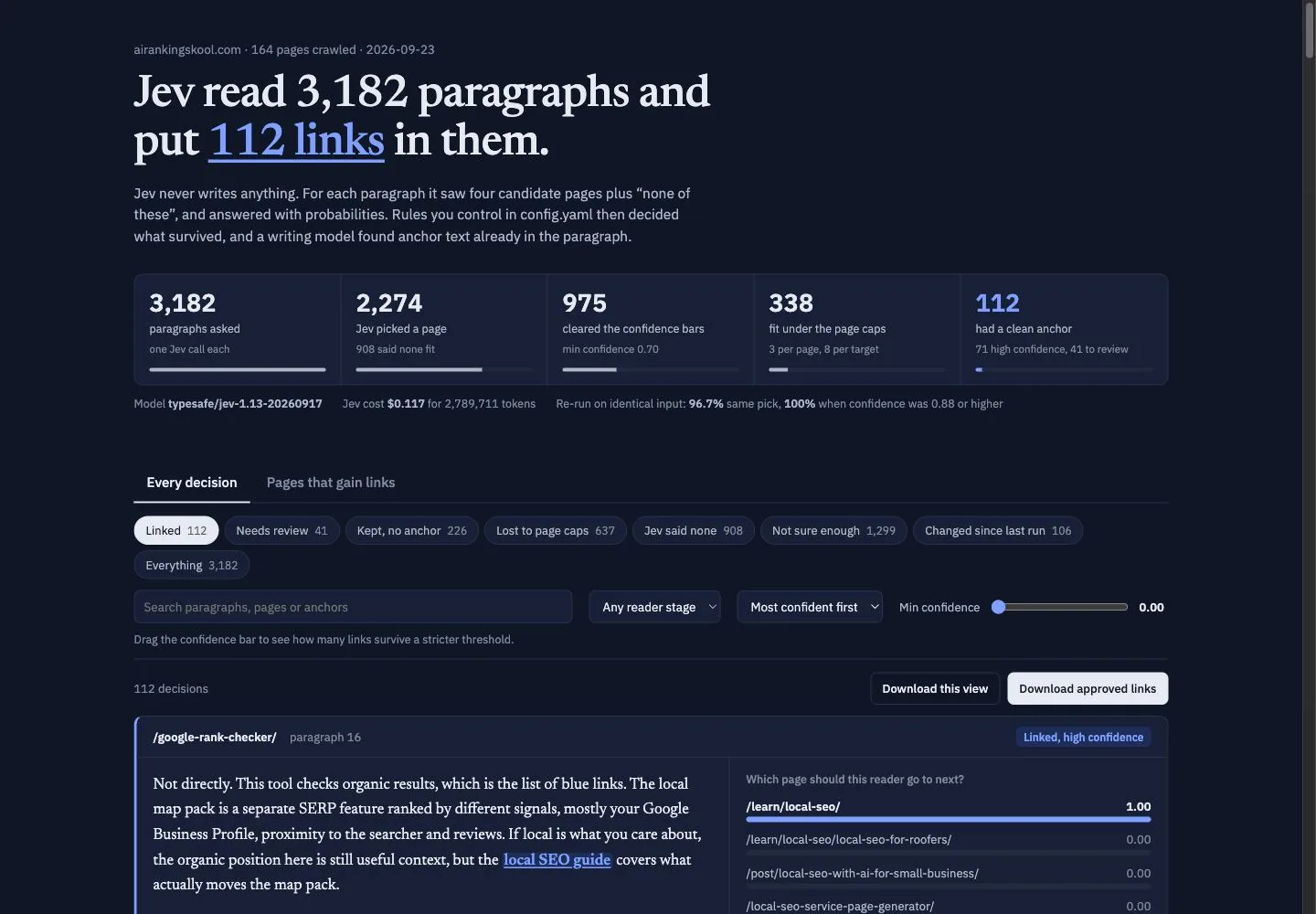
Another one I built is jev-internal-links. One Claude Code command crawls the site, asks TypeSafe's Jev model which page each paragraph should send the reader to next, applies your confidence and page caps, then opens an interactive report so you approve links before anything changes on the site. On airankingskool.com it read 3,182 paragraphs and proposed 112 links for about a dollar.
How do business owners, freelancers and agencies use SEO skills day to day?
The pattern is the same for all three: pick one job you repeat, turn it into a skill, and connect its data. What changes is how far you spread it.
- Business owners: one repeatable job, like a weekly check for pages sitting just off page one, run on your own site. One skill and one Search Console connection is enough to start.
- Freelancers: the same audit across every client site, so each client gets the same checklist and the same report format. The claude-seo README pitches exactly this to freelance SEO consultants: run an audit on the first call, before writing a proposal.
- Agencies: a shared, versioned skill set so every account gets the same process. In Claude Code, that means committing skills to a project's
.claude/skills/folder or packaging them as a plugin. On claude.ai Team and Enterprise plans, you can share or publish skills to your organization.
If you want to see how this looks once it grows, I wrote up the four Claude Code systems I use for keyword research, writing, site audits and content refreshes. Each one is a skill, and they share state so they don't trip over each other.
The same idea works beyond SEO. Anthropic's own example skill applies brand guidelines to documents, and the same approach suits copywriting, Google Business Profile posts and client reports.
Don't overcomplicate it. Pick one SEO job you repeat every week, connect the data it needs, and turn it into a skill. Once that one works, add the next. If you want help with the setup, the data side and a second pair of eyes on what your skills produce, that's what we do in the AI Ranking community. Join AI Ranking on Skool and bring the first skill you want to build.
Cheers,
Nico