How to Claim Your Business in ChatGPT (Business Hub): What I Saw at Launch, and What the Insights Actually Count
How to claim your business in ChatGPT's Business Hub by phone, email or DNS, plus what Insights really count.
To get your business on ChatGPT, open Business Hub, search for your business, claim it with a phone code, business email, DNS record or Shopify, then wait for OpenAI to approve the claim. I tried this for AI Ranking at launch, so this guide covers what I saw, plus what OpenAI's own pages say about the steps I haven't reached yet.
One flag so you don't land on the wrong product: this isn't ChatGPT Business, the self-serve workspace plan for teams. Different thing. This guide works for owners, freelancers and agencies claiming client businesses.
What is Businesses in ChatGPT, and how do you claim your business?
Businesses in ChatGPT is OpenAI's new beta, and Business Hub is where you claim your business, manage its details and see how people engage with it. You claim it by searching for the business, verifying your connection to it, and waiting for OpenAI's approval.
OpenAI's launch post (Nov 10, 2026) says Businesses in ChatGPT is in beta and is aimed at connecting businesses with the 1.2 billion people who use ChatGPT each week. In Business Hub, companies can claim their organization and, once verified, update key details and add product feeds with pricing and availability.
The step-by-step lives in OpenAI's setup help page: sign in, open Business Hub from the sidebar, search by name, pick the listing, verify, then wait. I'll walk through each of those below.
Business Hub is also separate from Business Agents (an optional extra, covered further down). The same help page says claiming, publishing an agent and advertising are separate, so you don't need an agent or ads to claim.
Who can claim a business in ChatGPT right now?
You can claim a business if you own it or you're authorized to represent it, and the business is eligible where ChatGPT is available. You don't need an Ads account or a ChatGPT Enterprise agreement.
OpenAI's help page says you'll need to verify your connection to the business and be approved. Eligible businesses can claim an existing business or add one where ChatGPT is available and the required verification is supported, and availability depends on the business's location and type.
| Type of business | What OpenAI's help page says |
|---|---|
| Online business | Can claim an existing listing. If you can't find yours, you may see an option to add it. |
| Local store or restaurant | Can currently claim only an existing US listing. |
| Business Agent (optional extra) | Separate requirements: eligible ecommerce and online service businesses in the US with a website, plus the industry requirements in the Business Agents Policy. |
When I searched for "AI Ranking", I got no match and an option to create it, which fits the online business row. Existing OpenAI Enterprise customers and advertisers can work with their OpenAI representative to claim, and Shopify merchants can connect a store from Business Hub or the Shopify admin, says the launch post.
How do you claim your business in ChatGPT (phone, text, email, or DNS)?
Here's the route, using OpenAI's help page for the steps and my own run for what it looked like. My experience: the setup was a bit buggy at launch. I reckon that's because a heap of people were trying to verify at the same time. Past that, it's relatively easy.
- Search. Sign in to ChatGPT, open Business Hub from the sidebar and search for your business by name.
- Pick the listing. Select the one that matches and confirm which ChatGPT account will manage it. No match? An eligible online business may see an option to add it.
- Verify. Choose one of the verification methods shown and follow the prompts.
- Wait. OpenAI reviews the claim and emails its decision.
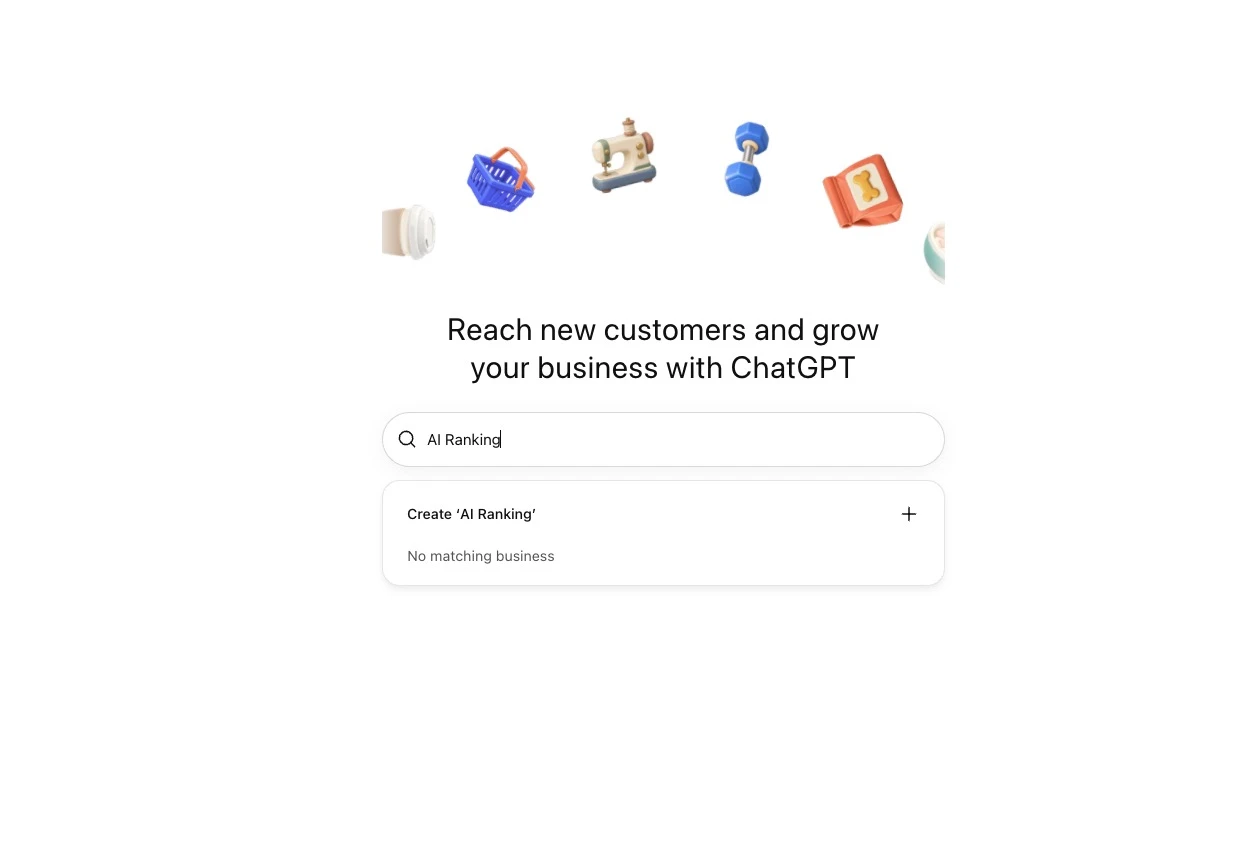
The methods on offer, in OpenAI's words, are:
- Business phone: choose a text message (SMS) or an automated call, select Get code, and enter the code sent to the number shown.
- Business email: select Get code and enter the code sent to the email address associated with your business.
- Website domain: add the TXT record ChatGPT shows to your domain's DNS settings, then come back and select Verify domain.
- Shopify store: select Connect Shopify, review the permissions, and log in to the store you're claiming.
Here's what happened on my side. The DNS TXT record verified successfully. The step that actually submitted my claim, though, was the phone one: ChatGPT texted me a code, I entered it, and I got put in what I'd call the waiting list. OpenAI's name for that stage is waiting for claim approval, and my claim is still pending review.
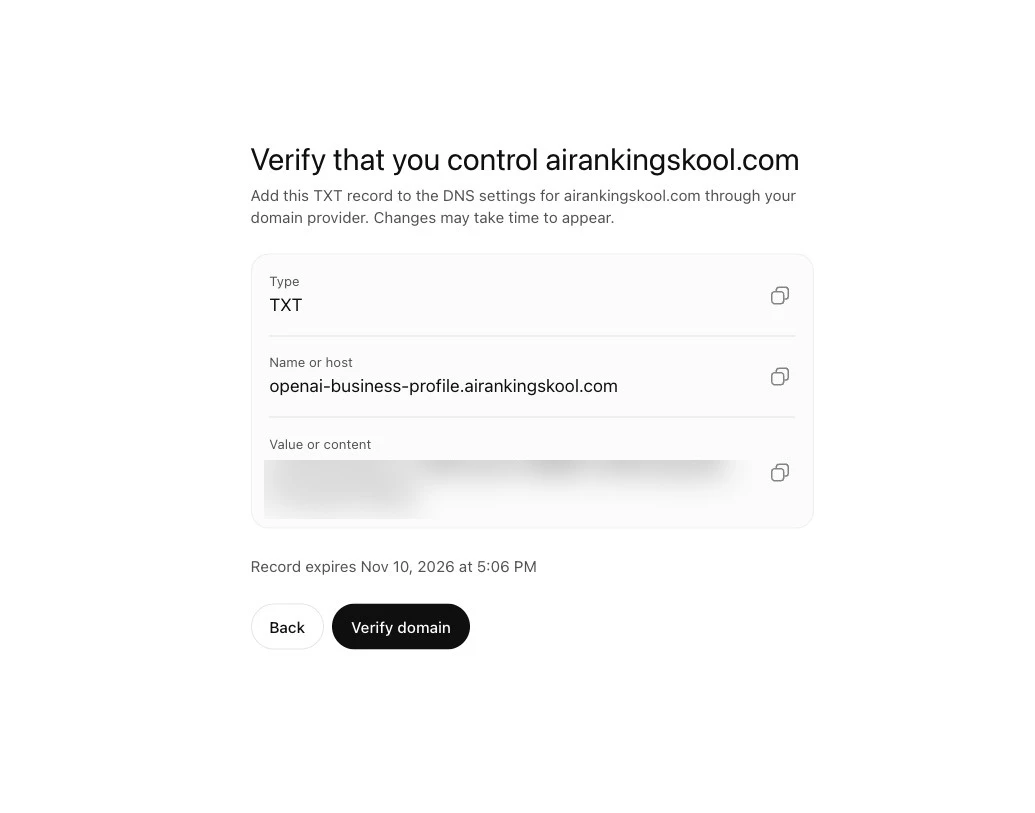
The DNS screen has three parts: Type (TXT), Name or host, and Value or content. My host was openai-business-profile.airankingskool.com, and the screen shows when the record expires. OpenAI says to copy the type, name or host, and value exactly, to ask whoever manages your domain if that isn't you, and that DNS changes may take time to appear. Then you return and select Verify domain. Blur that value in anything you share.
After that, OpenAI emails you its decision or a request for more information. While the claim is under review you can select Cancel claim, and the help page says to let the review finish before trying again. Mind you, it also says review time varies, and it doesn't give a number.
A few side branches from the same page. If you got a personal claim invitation, open the link in the email and sign in with the address that received it. If you see Contact support, the listing is locked and that button is how you ask for access. If someone else already claimed your business, you can open its profile and use Dispute ownership, which runs through Persona.
What is the Persona identity check, and when do you need it?
Persona is the identity check you complete after OpenAI approves your claim, before you can publish changes, connect a product feed, view Insights or create an eligible Business Agent. Claiming alone doesn't give you the blue check; Persona approval does.
I haven't hit the Persona step yet, so this section comes from OpenAI's help page, not from my account. It says you may need a government-issued ID, business registration information and proof that you're authorized to represent the business.
OpenAI reviews the submission and emails its decision or a request for more information, and you can cancel the submission while it's under review. Sending your details to Persona doesn't mean you're approved. If you claimed with another method first, you can finish Persona later: open the Business tab, select your profile, and find Complete verification with Persona in the overview.
One thing to read twice: if you use Persona to create a new profile, OpenAI's approval automatically publishes it, with no separate publishing step. Only continue when you're ready.
If a check fails or expires, follow the instructions in the email and select Try again if it's there. The help page says to make sure the business name, address, and any registration or tax number you provide match your official business records.
What do Business Hub Insights actually count?
Insights show aggregate activity for your business, including mentions, website clicks and discovery topics, and they only open up after your claim and Persona are approved. For an online business, a mention means ChatGPT referenced your website, not just your brand name.
I don't have Insights yet because I'm still waiting on the claim, so there's no dashboard screenshot here and no numbers from me. What follows is OpenAI's own definitions.
The help page says Insights show aggregate activity over the past 28 days, including mentions and website clicks. The launch post adds discovery topics: common themes across conversations where your website is cited.
| Insight | What OpenAI says counts | Watch out for |
|---|---|---|
| Mentions, online business | ChatGPT references your website | The brand name alone doesn't count |
| Mentions, local business | ChatGPT shows a result for that location | Counts even if nobody opens the listing or visits the website |
| Website clicks | How often people click through to your website | Clicks don't confirm website visits or conversions |
| Discovery topics | Common themes in ChatGPT answers that mentioned or cited your business | They don't reveal individual prompts or directly measure customer intent |
| A blank metric | Threshold not reached, data still being collected, or reporting unavailable | Doesn't necessarily mean zero activity |
The mention rule has two halves, and people tend to quote only one. Online businesses need ChatGPT to reference the website. Local businesses get a mention when ChatGPT shows a result for that location, and the help page is explicit that it counts even if the customer doesn't open the listing or visit the website.
On clicks, Search Engine Roundtable reported the tooltip as: "Number of recorded clicks on links to your website in ChatGPT. Clicks don't confirm website visits or conversions." It also lists profile views among the dashboard analytics. OpenAI's help page doesn't define profile views, so I'm not going to guess what it counts.
On privacy, the launch post says businesses don't get users' conversations or Business Agent chats, and Insights only appear when activity meets certain thresholds. The help page adds that counts may be incomplete, and that if a metric stays blank you should contact OpenAI Support.
Does claiming your business make ChatGPT recommend you more often?
No, not as far as OpenAI says. Claiming lets you manage the information you give ChatGPT about your business, but it doesn't guarantee more visibility or give you control over what ChatGPT recommends.
OpenAI's help FAQ puts it plainly:
Claiming lets you manage the information you provide about your business. It doesn’t guarantee increased visibility or give you direct control over ChatGPT’s independent recommendations. Advertising doesn’t influence ChatGPT’s independent answers.
Edits take time too. OpenAI reviews and publishes changes, updates can take a while to appear in a listing or an answer, and ChatGPT may also use other sources when it answers questions about your business. Even connecting a product feed doesn't guarantee ChatGPT recommends your products.
The one thing I'd keep in mind is the same as always: keep your NAP consistent. That's the same name, address and phone number on your Google Business Profile (if you have one), your website and the third-party directories. It's general hygiene, I didn't hit a mismatch, and nothing in OpenAI's pages says it boosts anything. For the wider local picture, here's the complete guide to local SEO.
Claiming the profile and getting named in answers are two different jobs, so I've kept this post to the first one. For the second, I split it across two pages. The ChatGPT SEO playbook covers the crawl and index side (GPTBot, Bing) and how to track citation frequency and share of voice. The nine ChatGPT citation strategies covers tactics like building topical authority on a narrow topic and getting mentioned on high-authority sources. Neither is about Business Hub.
What can a Business Agent do, and who is eligible?
A Business Agent is a separate, optional extra, and you can skip it entirely. After you claim, eligible organizations can build, test and launch an agent that answers questions about their offerings, says the launch post. The conversation is clearly labeled, separate from the customer's original ChatGPT conversation, and distinct from ChatGPT's independent answers.
Eligibility is narrower than claiming: ecommerce and online service businesses in the US with a website, plus the industry rules in the Business Agents Policy, which also says business verification alone doesn't guarantee agent eligibility. You don't need Shopify, and the agent needs your Persona approval first.
The current agent can't complete purchases, make bookings or check an order. It explains products and policies and links to your website, per the help FAQ. Customers can only chat with an agent you've published, and publishing is its own step.
What is still unverified, and what should you do this week?
Here's what I can't tell you yet, and I'd rather say so than guess:
- How long claim and Persona reviews take. OpenAI only says review time varies.
- Whether the launch bugs I ran into are still there.
- What the Insights thresholds are, and what profile views counts. OpenAI's pages don't say.
- How far the "existing US listing only" rule stretches beyond local stores and restaurants, which are the only types the help page names.
- Whether your business will see the option to add itself.
Now, the checklist for this week:
- Search Business Hub for your legal business name.
- Pick one verification method you can actually finish: phone, email, DNS or Shopify.
- Sort your NAP before you submit. Don't send it half-arsed and fix it later, because OpenAI says to wait for a pending review to finish before trying again.
- Submit, then wait for the email.
- Do Persona only when you have your documents to hand, and remember a profile created through Persona publishes on approval.
- Once approved, update your details: the help page lists website, description, category, logo, delivery policy and return policy.
- Decide about a Business Agent later, and only if you're eligible.
Freelancers and agencies: per the help page, the admin who claimed the business can add teammates in Business Hub and grant an agency access, and everyone uses their own ChatGPT account. For a business claimed in a ChatGPT workspace, invitees may need to be workspace members. If an agency invitation is blocked, contact OpenAI Support, and never forward a personal claim invitation.
So: claim it, verify it, keep your details consistent, and don't expect it to make ChatGPT recommend you. Tried to claim your business and got stuck on verification, Persona or a blank Insights tile? Bring a blurred Business Hub screenshot (hide any codes and TXT values) to a Premium live Q&A or a website review and we'll go through it. Not a member yet? The free AI Search Kickstarter is a good place to start.
Cheers,
Nico