Is SEO a Good Career in 2026? Salary Data, Job Market & How to Get Started

Every year, someone declares SEO dead. Every year, the industry grows. Here is what the data actually says about building a career in SEO right now: who is hiring, what they are paying, and why AI is creating more opportunity, not less.
The SEO Job Market in 2026: A $108 Billion Industry
The SEO services market is valued at $108 billion in 2026 and is projected to reach $343 billion by 2035. That is not a dying industry.
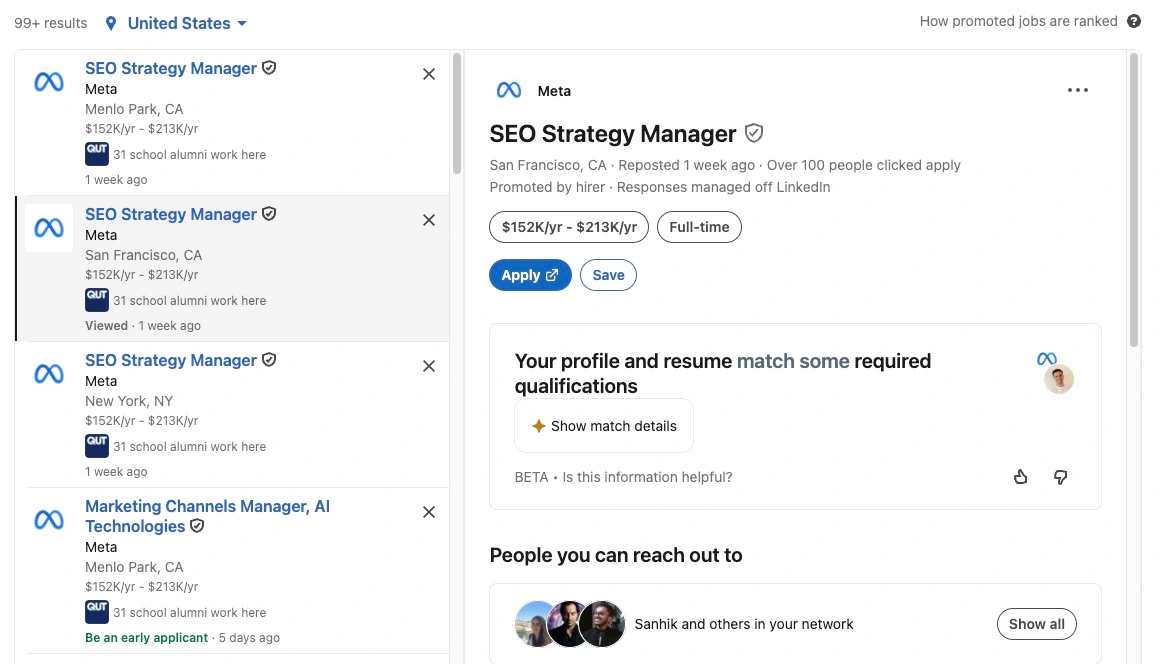
Right now, there are over 10,000 SEO jobs on LinkedIn in the US alone. Glassdoor shows 7,770 listings. Indeed has close to 6,000. According to Previsible's analysis of 10,000+ job listings, SEO job postings increased 41% from 2023 to 2024, and demand in SaaS and tech startups grew by over 30% in 2025. The Bureau of Labor Statistics projects 10% growth for marketing and SEO roles through 2032.
Major companies hiring include Adobe, Caterpillar, Grammarly, E.L.F. Beauty, Red Ventures (CNET, Healthline, Bankrate), and Salesforce. According to industry data, 65% of SEO jobs are now in-house. Remote work sits at 34% fully remote, trending toward 40-45%, and companies offering remote work receive 3x more applications.
How Much Do SEO Professionals Actually Make?
According to Conductor, SEO specialist salaries jumped 28% recently, outpacing general marketing roles by 8 points. 64.5% of SEO professionals received raises in the past year.
| Role | Low | Average | High |
|---|---|---|---|
| SEO Specialist (entry) | $45,000 | $59K - $66K | $85,000 |
| SEO Manager | $68,000 | $79K - $81K | $120,000 |
| Senior SEO Manager | $82,000 | $100,000 | $114,000 |
| SEO Director / Head of SEO | $83,000 | $151,000 | $243,000 |
| VP of SEO | $85,000 | $105,000 | $125,000 |
| Global SEO Director | $110,000 | $148,000 | $185,000 |
Sources: PayScale, Glassdoor, ZipRecruiter, Built In, First Page Sage
SEO managers earn 41.5% more than non-managers. And with only 27% of SEOs considering their salary competitive, demand continues to outpace supply.
The Freelance SEO Path: $150/Hour Is Real
According to ZipRecruiter, the average freelance SEO earns $113,333/year. Nearly 14% earn over $150,000. Freelancers working 20 hours/week earn 64% more per hour than in-house counterparts.
| Experience | Hourly Rate | Monthly Retainer | Annual (est.) |
|---|---|---|---|
| Beginner (0-2 yrs) | $50 - $75 | $750 - $1,500 | $40K - $70K |
| Intermediate (2-5 yrs) | $75 - $150 | $1,500 - $3,500 | $70K - $130K |
| Senior (5+ yrs) | $150 - $250 | $3,500 - $7,500 | $130K - $200K+ |
| Enterprise | $250 - $500 | $10,000 - $25,000 | $200K - $400K+ |
Sources: SoloHourly, Backlinko, SE Ranking
SEO is one of the few careers where you can build a six-figure business with near-zero startup costs. No inventory, no office, no employees. Your knowledge is the product. And SEO clients need ongoing support, which means recurring revenue.
"Is SEO Dead?" Why the Data Says the Opposite
The SEO services market grew from $75 billion to $89 billion in a single year (18.3%). Google search grew 21% in 2024. 68% of all website clicks still come from organic search. All AI search platforms combined account for less than 1.08% of total referral traffic.
What IS Dying vs. What IS Thriving
| Dying | Thriving |
|---|---|
| Link building (-86% projected) | SEO Strategist (+117% growth) |
| Keyword stuffing / shortcut SEO | GEO / AI Search Optimization (+34% CAGR) |
| Template content at scale | Thought Leadership Content (+185%) |
| Manual technical audits | AI-Assisted Technical SEO |
| Google-only focus | Multi-platform (YouTube, TikTok, AI) |
Source: First Page Sage SEO Salary Report
Will AI Replace SEO Jobs? (The Real Answer)
AI is replacing tasks, not jobs. According to Semrush, 72% of SEO professionals who upskilled in AI saw measurable career improvements. AI skill mentions in job postings climbed 21% year-over-year.
Meanwhile, the Generative Engine Optimization (GEO) market is projected to reach $7.3 billion by 2031 (34% CAGR), the fastest-growing segment in search marketing. 94% of enterprise CMOs plan to increase GEO investment in 2026.
"AI isn't just a tool; it's becoming a prerequisite. The most effective SEO professionals will be those who master AI for productivity, data refinement, and tool development."
Jordan Koene, CEO of Previsible
New roles AI is creating: AI SEO / GEO Specialist (Caterpillar), AI Search Specialist (Manychat), Content SEO Manager (20% of all listings), Head of Organic Growth, and Digital Experience Strategist.
Do You Need a Degree to Work in SEO?
No. According to Teal's analysis, less than 30% of SEO job postings require a degree. Self-taught paths through Coursera, YouTube, and communities are increasingly accepted. This makes SEO one of the most accessible paths to a $100,000+ career with no college degree.
How Long Does It Take to Learn SEO?
How search engines work, keyword basics, on-page fundamentals, Search Console setup
Technical SEO basics, content optimization, link building concepts, tool proficiency
Running campaigns, seeing real ranking improvements, building a portfolio
Full SEO campaigns, technical audits, content strategy, client reporting
Strategic leadership, enterprise SEO, consulting at $150+/hour
Compare: a coding bootcamp takes 3-6 months and costs $10K-$20K. An MBA takes 2 years at $60K-$200K. SEO gets you to professional level in 12-18 months with free or low-cost resources, and you can earn while you learn.
Agency vs. In-House vs. Freelance: Which Path?
Agency
Best for: Fast learnersMedian: $50,000Pros: Many industries, rapid skill building, mentoring
Cons: Time pressure, lower pay, higher burnout
In-House
Best for: Depth seekersMedian: $53,100Pros: Deep expertise, stability, benefits
Cons: Career ceiling, less variety, stagnation risk
Freelance
Best for: IndependenceMedian: $113,000Pros: Highest earnings, flexibility, location freedom
Cons: Income volatility early on, isolation, no benefits
Data: SE Ranking, Search Engine Land
SEO vs. Other Digital Marketing Careers
| Factor | SEO | PPC | Content Mktg | Social |
|---|---|---|---|---|
| Entry Salary | $59K-$66K | $47K-$76K | $55K-$70K | $45K-$63K |
| Senior Salary | $100K-$185K | $90K-$150K | $97K-$115K | $77K-$100K |
| Freelance Upside | Very High | High | Medium | Low-Med |
| AI Risk | Low | Medium | High | Medium |
| No-Degree | Yes (70%+) | Yes | Varies | Yes |
The best advice from industry leaders: combine SEO + one other skill (PPC, data analytics, content strategy, or AI tools). Combined SEO+PPC managers earn an average of $150,590.
Future-Proof Your SEO Career: Skills You Need Now
Source: Lumar SEO Skills Survey
Source: First Page Sage. 75% of job postings require technical SEO; 70% require Semrush or Ahrefs.
How to Start Your SEO Career in 2026
- Learn the fundamentals (free) Google's SEO Starter Guide, YouTube channels (Ahrefs, Matt Diggity), and community learning.
- Build a website and practice Start a blog or niche site. Apply what you learn in real time and track results.
- Master the tools Google Analytics 4, Search Console, and one paid tool (Ahrefs, Semrush, or SE Ranking). These appear in 70%+ of job descriptions.
- Learn AI-powered SEO Use AI for keyword clustering, content optimization, schema generation. This is the 2026 differentiator.
- Build a portfolio with results Offer free or discounted SEO to 2-3 local businesses. Document before-and-after outcomes.
- Join a community SEO changes constantly. A community with experienced practitioners accelerates learning dramatically.
- Specialize Pick a niche: technical SEO, local, e-commerce, SaaS, or the fast-growing GEO space. Specialists earn more.
- Build your personal brand Share on LinkedIn, start a newsletter. The best opportunities come through reputation.
Learn AI-Powered SEO with 490+ Members
AI Ranking teaches you the exact SEO and AI skills companies are paying $100,000+ for. Weekly Q&As, custom tools, courses, and a community of practitioners. Starting at $27/month.
Join AI RankingFAQ: SEO Career Questions Answered
Ready to Start Your SEO Career?
Join 490+ members learning AI-powered SEO. Weekly live Q&As, custom tools, step-by-step courses. Less than the cost of one SEO audit.
Join AI Ranking TodayExplore Our Latest Insights
Stay updated with our recent blog posts.
Five free AI prompts that fix the SEO problems eating your week: mining Google Search Console for quick-win pages, reviving old content, redesigning for conversions, plain-English technical audits, and writing content built for AI search engines. Works in Claude, GPT, Gemini, or Perplexity.
Why do five prompts beat another SEO tool subscription?
Because the bottleneck in SEO is rarely data, it is knowing what to do with the data you already have. The right prompt turns a pile of numbers into a short list of actions you can knock out today, and you do not need to pay for another dashboard to get there.
Each of the five prompts below maps to a problem you are probably wrestling with every week: hidden quick wins, stale posts, leaky pages, scary technical reports, and content that AI search engines ignore. They run in Claude as your SEO assistant, ChatGPT, Gemini, or Perplexity. All five (plus the free tools) are linked at the bottom.
How do you find quick SEO wins hiding in Google Search Console?
Export three months of Search Console data and let an AI rank your lowest-hanging fruit for you. Everything you need to grow traffic is already in Google Search Console, the problem is that it is buried under hundreds of rows nobody has time to read.
Here is the flow:
- In Search Console, open the Performance tab and set the date range to at least the last 3 months.
- Export the data as a CSV and download it.
- Paste Prompt 1 into your AI of choice and fill in your website URL (context matters: data without context is useless).
- Drop the CSV in, crank the thinking effort to high if you have the option, and hit enter.
A couple of minutes later you get a report of the single best opportunity on your site plus your top three quick wins, with exactly what to change on each page. Fix those and the traffic usually shows up within days, not months.
Community win: Steven in our community used a data-first approach like this across 800+ location pages, and now books around 105 appointments a month with pages that index in under an hour.
Should you revive old content instead of writing new posts?
Yes, and most people skip it. Google and the AI search engines love freshly updated content, so anything on your site older than 10 to 12 months is a candidate for a revival rather than another brand-new post nobody asked for.
Prompt 2 is a content revival prompt. Paste it in, give it your target keyword and the page URL, and let it run. It takes a while on purpose, because it then asks you for your own insights on the topic. That step is what separates this from generic, regurgitated AI slop: your angle goes in, so your expertise comes out.
You get back an artifact explaining why the page is underperforming, how to weave in your unique angle, and the exact changes to make. Do not paste the rewrite wholesale, lift the strong parts and make them yours. If you want the full system, our content revival playbook goes deeper. Run this once a week and old posts stop being dead weight.
Can AI redesign your homepage for more conversions?
It can, and it only needs a screenshot to do it. Prompt 3 helps you redesign your homepage from a conversion-first perspective so you squeeze more leads out of the same traffic you already have.
You need one free tool: the GoFullPage Chrome extension, which captures a full-page screenshot in one click. Then:
- Take the full-page screenshot and download it.
- Start a fresh AI conversation, attach the screenshot, and paste Prompt 3.
- Fill in the page URL for context and hit enter.
This one is a two-step prompt. First you get a detailed analysis of what is hurting conversions, then it hands you a second prompt to feed into a model with image generation so you can actually visualize the redesign. More leads from traffic you have already earned is the cheapest growth there is.
Community win: William Moon, a financial advisor in Arizona, lifted his click-through rate from 0.3% to 2.3% by reworking his pages around what users and AI actually want, then closed a $165,000 deal off a single AI-driven lead.
How do you fix technical SEO without reading a technical report?
You ask the AI to audit your site and explain the fixes in plain English. Technical SEO scares people because the reports read like a server log. Prompt 4 fixes that.
Run a free speed and health check (something like GTmetrix works), then feed the results into Prompt 4 along with your URL and what your site is built on (for example, WordPress). Instead of a wall of jargon, you get a verdict in normal language: here is what is wrong, here is why it is happening, and here is exactly how to fix it.
For example, it might tell you a page takes four seconds to load, explain precisely why it is slow, and list the steps to speed it up. Run this once a month or every couple of months and your technical foundation stops quietly bleeding rankings.
How do you write content that AI search engines actually cite?
You write for fan-out queries, the hidden sub-questions AI engines generate before they answer. When someone asks ChatGPT or Google AI Overviews a question, the engine quietly fans it out into five or six related questions, searches all of them, then synthesizes an answer. The pages that match those hidden questions are the pages that get cited. (We broke down the mechanic in full in this guide to fan-out queries.)
The catch: you cannot see fan-out queries in any normal keyword tool. You need one that surfaces them, and you can use DataWise free, no credit card required:
- In DataWise, open Keyword Research and pick the Fan-Out Queries tab.
- Drop in your seed keyword (for example, kitchen cabinets).
- Review the fan-out queries it returns: these are the real questions AI engines are asking on your behalf.
- Export them to a CSV.
Then comes Prompt 5. Paste it into Claude or ChatGPT, add your seed keyword, your homepage URL, and how many posts you can realistically publish per week (stick to one to four, especially on a new site, or you risk getting flagged). Drop in the exported fan-out queries and hit enter.
You get back a content plan: article titles, the exact queries each one should target, a publishing calendar, and an explanation of why the posts will not cannibalize each other. Follow it, write genuinely good content, and you start showing up in AI answers. For the writing system itself, see how to rank in ChatGPT. It matters more than ever: AI search visitors convert around 4.4x better than traditional organic visitors.
Community win: Tim Armstrong had a client land a mortgage lead directly from a ChatGPT recommendation, with the AI calling them one of the "best options in America." That is what matching fan-out queries gets you.
Frequently Asked Questions
Do these prompts work in ChatGPT and Gemini, or only Claude?
All five work in Claude, ChatGPT, Gemini, and Perplexity. Claude tends to shine on the long, multi-step prompts (revival and fan-out planning), but any capable model will run them. Use whatever you already pay for, or the free tiers.
What does "increase the thinking effort" mean?
Newer models let you dial up reasoning depth (high, extra high, extended thinking). More effort means a more thorough report, which matters for the Search Console and technical audit prompts. If your model does not offer it, do not worry, the prompts still work.
How often should I run each prompt?
Search Console quick wins: monthly. Content revival: weekly, on posts older than 10 to 12 months. Conversion redesign: when traffic is flat but you want more leads. Technical audit: every one to two months. Fan-out content planning: whenever you are filling your content calendar.
Are the tools actually free?
Yes. GoFullPage and GTmetrix have free tiers, and DataWise gives you free fan-out query lookups with no credit card. The five prompts are free inside our community (link below).
Get the 5 prompts free
All five prompts, plus every other SEO prompt, skill, and tool I share, live inside the free AI Ranking community. Thousands of members use them to rank number one and grow their AI search visibility. There is also a seven-lesson AI search kickstarter waiting for you, including the lesson on writing content AI loves.
Join the free AI Ranking community and grab the prompts. Want the deeper systems? See how I built four Claude Code SEO systems that run my entire workflow.
Resources
Free tools mentioned:
- GoFullPage (full-page screenshot Chrome extension)
- GTmetrix: gtmetrix.com
- DataWise (fan-out queries): datawiseseo.com
Related reading:
- Fan-Out Queries: The Hidden ChatGPT Searches That Decide If You Get Cited
- How to Rank in ChatGPT: 9 Strategies That Actually Work
- Turn Claude Into Your Own Personal SEO Assistant
- The AI Content Writing Checklist
- I Built 4 Claude Code SEO Systems (14.4M Impressions)
Source: Semrush AI search traffic study

5 Free SEO Prompts That Fix Your Biggest SEO Problems (Claude, GPT, Gemini, Perplexity)

Connecting Claude to your live data used to be a fragile, MCP-breaking nightmare. With Windsor.ai you connect 325+ data sources in one click, then hand Claude one prompt to build a live SEO dashboard that joins Analytics, Search Console, and YouTube. The real unlock is a self-learning loop where Claude reads the data and fixes your site too.
Why connect Claude to your live SEO data at all?
Because a chatbot that cannot see your numbers can only give you generic advice, and a chatbot that can see your numbers becomes a strategist. Once Claude has a bird's eye view of your Google Analytics, Search Console, and YouTube data together, it stops guessing and starts telling you exactly what is bringing in the right traffic, what is underperforming, and where your quick wins are hiding.
That is the difference between asking "how do I improve my SEO?" and asking "which of my pages lost the most clicks last month and what should I fix first?" The second question only works when the data is actually plugged in.
This matters more in 2026 than ever, because AI search traffic now converts roughly five times better than traditional organic clicks. When every visit is worth more, knowing precisely where your good traffic comes from is no longer a nice-to-have. It is the whole game.
Why is connecting data to Claude usually such a nightmare?
Because stitching together separate platforms like Google Search Console, Google Analytics, and YouTube through individual MCP servers breaks constantly. You end up spending more time fixing the connection than doing actual work.
It gets worse the moment you want to add Meta Ads, TikTok, Google Ads, or anything else. Each one is its own auth flow, its own quirks, its own thing to babysit. Most people give up and go back to manually exporting CSVs, which defeats the entire point of having an AI assistant.
The fix is to stop connecting things one fragile pipe at a time and route everything through a single stable connector instead. That is what turns this from a weekend of debugging into an eight-minute setup.
What is Windsor.ai and how does it fix the connection problem?
Windsor.ai is a single connector that plugs 325+ platforms into Claude with one click each, and the connection stays stable instead of breaking every other day. Think of it as the universal adapter between your data and your AI.
The list of what you can connect is huge: Google Analytics (GA4), Google Search Console, YouTube, Meta Ads, TikTok, Google Ads, Instagram, LinkedIn, and hundreds more. And it is not Claude-only. If you run a different model, Windsor.ai has connections for GPT and other AIs too, so the workflow is not locked to one vendor.
Here is the setup, step by step:
- Create your account and log in (the basic plan is plenty to start).
- Search for your platform in the left-hand panel, for example Google Analytics, and sign in to the Google account that owns the data.
- Select the exact account you want to expose, then choose Claude Code / Cowork as the destination. Windsor.ai even hands you the exact installation guide.
- Click connect in the directory, hit the connect button, and you are done.
Repeat that for each source you care about. If you do SEO and YouTube, connect Analytics, Search Console, and YouTube. If you run an agency on paid traffic, connect Meta Ads and Google Ads instead. Same process either way.
Want the prompt and the full repeatable system behind this? It is the same philosophy as the four Claude Code systems that run my entire SEO workflow: build it once, then let it run.
What is the auto-approve tip that speeds everything up?
In Windsor.ai's customize settings, find the connector and allow everything instead of leaving approval required on every call. If you skip this, Claude stops and waits for you to click approve on every single data fetch, which kills the workflow.
The reason this is safe right now is that the connection is read-only: it gets data, it does not act on your behalf. So letting it pull freely costs you nothing but saves you a hundred permission clicks.
Heads up: Windsor.ai is reportedly adding write actions soon (posting for you, even running your ads). Once that ships, you will want to tighten permissions back up and keep approval on for anything that takes action. Read access, allow it all. Write access, gate it.
How do you verify Claude is actually pulling the right data?
Test each connection with a simple question the moment you make it, then cross-check the answer against the source platform. Trust, but verify.
After connecting Google Analytics, I asked Claude something basic: "Using the Windsor.ai MCP, what was the traffic source that brought the most traffic to AI Ranking over the past 30 days?" You can see it working because the little Windsor icon appears while it fetches. It came back with direct as number one, and a YouTube source second at 471 sessions.
Then I opened Google Analytics, set traffic acquisition to the same last-30-days window, and checked YouTube: 471 sessions. Exact match. The data lines up, so I know the connection is solid.
Do this for every source as you add it. It takes ten seconds and it means you are never building strategy on top of a broken pipe.
What is the exact prompt that builds the dashboard?
Once your connections are live, you give Claude a single instructions file (an MD file) that tells it how to join the data and build the dashboard, and it does the rest. No manual chart-building, no Looker Studio wrestling.
If you do not work with Analytics, Search Console, and YouTube and instead run ads, you use a meta prompt to design your own version. Something like: "You have these connections for Meta Ads and Google Ads. Understand the incoming data and tell me the best way to build a dashboard that joins these data sets in a digestible format." That phrase, "digestible format," is the magic direction. It pushes Claude toward a dashboard that actually makes sense instead of a wall of numbers.
The output is a live artifact you can read, restyle in any direction you want, and share with your team or clients. Compare that to free reporting tools like Looker Studio, which can be a nightmare to wire up and do not let you chat with the data afterwards. Here, you just ask.
This is the same "Claude as your analyst" idea behind turning Claude into your own personal SEO assistant, except now it is reading your real numbers instead of working blind.
What does the dashboard actually tell you?
It sorts everything into three buckets: what's working, what needs work, and where your quick wins are. That framing is what turns raw data into a to-do list.
Instead of staring at a Search Console export trying to spot patterns, you get pages flagged by status, traffic sources ranked by what converts, and YouTube videos sorted by which ones actually drive business (not just views). The dashboard joins it all so you see, for example, that a YouTube source is your second-biggest traffic driver and decide whether to lean into it.
This is the reporting problem and the connection problem solved at the same time. And because it is a live artifact, you share it with a teammate or a client in one link, no exports required.
Community win: William Moon, a financial advisor in Arizona, used this kind of "find the underperformer, then fix it" approach to take one page from a 0.3% click-through rate to 2.3%, then closed a $165,000 deal off the back of it. The dashboard tells you which page. The fix turns it into revenue.
How do you turn this into a self-learning SEO loop?
You connect Claude not just to your data sources but to your website builder too (WordPress, Webflow, or whatever you use), so it can read the data, suggest the fix, and then actually make the change. That is the mastermind moment.
The simplest version is to end your session by asking Claude, "Based on this dashboard, what should I fix this week?" It reads the numbers and hands you a prioritised action list, not a vague report. The advanced version wires the website connection in so Claude can go and implement those fixes directly.
You can take it further still by adding schedules, so Claude reviews the data and takes action on a recurring basis without you touching anything. But here is the non-negotiable: keep a human in the loop. Build a gate where someone reviews before changes go live, because no matter how good Claude is, it can make mistakes, and you never want it running a part of your business completely unsupervised.
Community win: Steven runs 800-plus location pages generating around 105 appointments a month, with new pages indexing in under an hour because his on-site structure is dialled in. That is the kind of operation where a data-to-action loop earns its keep, and it is the same systems-feed-each-other approach behind 4 automated local SEO systems pulling 99 bookings a month.
What should you connect next?
Connect whatever maps to how you actually make money, then save the whole workflow as a reusable Skill so you can run it in seconds. For most people that means going beyond the basics into Meta Ads, TikTok, Google My Business, WordPress, or Webflow.
A few high-leverage next steps:
- Google My Business: soon you will be able to read reviews and have Claude draft (or post) responses automatically.
- Meta Ads and Google Ads: join paid and organic in one dashboard so you finally see the full funnel.
- WordPress or Webflow: this is the one that unlocks the self-learning loop, because it lets Claude fix things instead of just suggesting them.
Package the connections plus the dashboard prompt as a Skill and your weekly reporting drops from hours to a single command. That is the payoff: a setup you build once and reuse forever.
Frequently Asked Questions
Is connecting Claude to my data through Windsor.ai safe?
Yes, because the current connection is read-only: it fetches data but cannot act on your behalf. That is why the auto-approve tip is safe to use. When Windsor.ai adds write actions (posting, running ads), tighten permissions and keep manual approval on anything that takes action.
Do I need Windsor.ai, or can I use MCP servers directly?
You can use individual MCP servers, but connecting multiple platforms that way tends to break often and eats more time than it saves. Windsor.ai routes 325+ sources through one stable connector with a one-click setup per source, which is why it is the easier path for a multi-source dashboard.
Does this only work with Claude?
No. Windsor.ai supports connections for GPT and other AI models too, so the same data pipeline works even if Claude is not your tool of choice. The dashboard prompt approach carries over.
Can Claude actually fix my website, or just report on it?
It can do both, but only if you connect it to your website builder (WordPress, Webflow, and similar). With that connection in place, Claude can implement changes directly. Without it, you get analysis and recommendations you apply yourself. Either way, keep a human reviewing before changes go live.
What is the fastest way to reuse this every week?
Save the connections plus your dashboard prompt as a reusable Claude Skill. Then your entire weekly report becomes a single command instead of a manual rebuild. This pairs well with the broader AI SEO strategy checklist for 2026.
Want to build your own SEO mastermind?
Connecting your data to Claude is the moment SEO stops being guesswork and starts being a feedback loop. One click per source, one prompt for the dashboard, one weekly question about what to fix, and an optional human-gated loop that lets Claude do the fixing.
Inside the AI Ranking community we hand you the exact dashboard MD file, the connection walkthroughs, and the Skills to run it weekly in seconds, plus support wiring it into your own site. It is the same system members like William and Steven use to turn data into ranked pages and booked revenue. The link is below.
Resources
- Watch the full video: I Made Claude My SEO Mastermind in 8 Minutes
- Windsor.ai (use code AIRANKING for 15% off)
- I Built 4 Claude Code Systems That Run My Entire SEO Workflow
- Turn Claude Into Your Own Personal SEO Assistant
- 4 Automated Local SEO Systems (99 Bookings a Month)
- The AI SEO Strategy Checklist for 2026
- Ahrefs: AI search traffic conversions

I Made Claude My SEO Mastermind in 8 Minutes

Local SEO is not a checklist of 50 things. It is four automated systems: a citations auditor, an on-site page checker, a Google Business Profile content feed, and a smart review responder. The same setup is getting one local business 99 booked appointments a month from organic alone. No ads, no agency, no cold outreach.
Why does local SEO feel so overwhelming?
Because most people treat it like a checklist of 50 disconnected tasks, when the reality is much simpler when it is done correctly. Local SEO really splits into two halves: your website, and your Google Business Profile. Once you see it that way, the chaos turns into four systems you can automate and forget.
That is exactly what one local business did. It is now pulling 99 booked appointments every single month from organic traffic alone, ranking in the map packs, and getting recommended by Google's AI Overviews when someone searches for their service locally. No ad spend. No agency. No cold outreach. Just systems running on autopilot.
This matters more than ever in 2026, because traffic from AI search engines now converts roughly five times better than traditional organic clicks, and local queries are some of the lowest-competition AI Overview real estate left. Local businesses that get the structure right beat competitors spending ten times more on ads.
What are the 4 systems that automate local SEO?
The four systems are a local citations auditor, an on-site page checker, a Google Business Profile content feed, and a smart review responder. The first two fix your website. The last two run your Google Business Profile like a social channel without you touching it.
Here is how they break down:
- System 1: Citations auditor. A Claude skill that finds every relevant local directory you should be listed in and hands you a consistent NAP block.
- System 2: On-site page checker. A Claude skill that audits whether your service pages are even indexable, plus schema, content depth, and internal links.
- System 3: Google Business Profile content feed. A Pabbly automation that pushes your Instagram media and your blog posts to your profile automatically.
- System 4: Smart review responder. A Pabbly plus Claude automation that replies to positive reviews instantly and routes negative ones to a human.
This is the same "systems feed each other" approach behind the 4 Claude Code systems that run my entire SEO workflow, just pointed at local.
How does the local citations auditor work?
It crawls the business website, understands what the business actually does, and returns every relevant local citation directory plus a locked NAP block to use everywhere. Citations are other local or business directory sites linking to and mentioning you, and they add real trust because they prove you are a genuine business.
You install it once as a skill in the Claude desktop app (Settings, then create a new skill, then upload the zipped skill file). After that you just say "using the local citation skill, run this site" and give it the URL.
What comes back is specific, not generic. For a wedding catering business it surfaced the obvious ones (Google Business, Bing Places, Yelp) and then niche gold like a wedding suppliers directory and a restaurant and catering industry association. Some are free, some are paid, and you decide what is worth it.
The critical output is the NAP block: name, address, and phone number that must stay byte-for-byte identical across every listing. Inconsistent NAP is one of the quietest local SEO killers. Ask Claude to export the list as a CSV so you can track which directories are done.
If you have budget but no time, a service like BrightLocal will build citations for you at roughly $3.20 each, so about $30 covers a solid batch. The skill route is free and just costs you the upload time.
How do you know if your pages are even getting indexed?
You run the on-site page checker skill against each service page, because publishing a page does not mean Google has added it to its index. This is the most important of the website systems, and the one almost everyone skips.
Grab a specific service URL (say your "corporate events" page), hand it to the local business auditor skill, and you get a prioritised report covering:
- Indexability, so you know if the page is actually in Google at all
- Schema markup, which is usually missing and is the translation layer AI uses to understand you
- Content depth and quality flagged in plain red or green status
- NAP consistency on the page itself
- Internal linking, images, and file issues
Schema is a force multiplier here: structured data measurably increases the odds you show up in AI summaries, and missing it is the difference between a page that ranks and one that is invisible. You do not need to run this weekly. Once every six months per page is plenty.
Community win: William Moon, a financial advisor in Arizona, used this exact "fix the page, add the structure" approach and took one page from a 0.3% click-through rate to 2.3%, then closed a $165,000 deal off the back of it. Structure on the page is not busywork. It is revenue.
How do you automate your Google Business Profile content?
You treat your profile like a social media account and let Pabbly feed it for you, because Google rewards active profiles and there is a strong correlation between profiles with 100-plus images or videos and the ones that actually perform. The catch is finding the time, so you automate two flows.
Flow 1: Instagram to Google Business Profile. In Pabbly Connect, the trigger is a new Instagram media post. A router splits videos from photos, and each branch uploads the media straight to the Google Business Profile using the standard Google Business connection (no developer access needed, which is the part people usually get rejected for). You already make this content, so the profile fills itself.
Flow 2: Blog post to Google Business Profile post. The trigger is a new or changed CMS collection item from your site (Webflow, WordPress, Wix, anything Pabbly connects to). The blog content is passed to Claude through the Anthropic connection with a system prompt that rewrites it under the 1,500 character profile limit, in your tone of voice. Then it posts back as a call-to-action update linking to the full article.
One sane tip from the build: do not use Opus for the rewrite. As I put it in the video, that is "the equivalent of using a Ferrari to drop your kids off to school." Sonnet 4.5 or 4.6 with around 3,000 max tokens is the right tool. This is the same Claude-as-your-SEO-assistant pattern, just wired into an automation instead of a chat window.
Pick a content source you know you will actually publish to regularly. If you write blogs, use blogs. If you live on LinkedIn, trigger off that instead. The automation only works if the source keeps producing.
What is the right way to handle Google reviews at scale?
Auto-respond to every positive review, and keep a human in the loop for negative ones. Responding to reviews matters for both ranking and trust, but the two types need completely different handling, so the automation forks on the star rating.
For positive reviews (4 and 5 stars), the rules are: thank them, acknowledge the specific thing they mentioned, and invite them back. Mentioning the service and location in the reply also helps you with Google's newer Ask Maps mode. In Pabbly the flow is: new review trigger, router on star rating, pass the reviewer name and comment to Claude (Sonnet 4.6) with a tuned system prompt, then post the reply back. The responses come out warm and specific, not robotic, because the prompt has full context.
For negative reviews (1 to 3 stars), do not automate the reply. Too much can go wrong, and a bad automated response to an unhappy customer is worse than no response. Instead, the flow emails the business owner or manager an alert with the reviewer name, the comment, and a link to the profile. The human writes the reply: thank them, acknowledge the experience, and take it offline fast (give them a direct email to resolve it).
That public "we owned it and fixed it" response is its own trust signal. People reading reviews trust a business that handled one bad experience well more than a business with zero negatives.
Community win: Tim Armstrong had a client land a mortgage lead directly from a ChatGPT recommendation. The prospect literally said ChatGPT told them this was the best option. That is what happens when your reviews, citations, and on-page structure all line up: the AI starts recommending you by name. It is the same outcome behind ranking inside ChatGPT itself.
Do these systems actually move the needle?
Yes, and the numbers back it up. The business in this build is at 99 booked appointments a month from organic alone. Another member, Steven, runs 800-plus location pages generating around 105 appointments a month, with new pages indexing in under an hour because the on-site structure is dialled in.
The wider data explains why local is such an opportunity right now:
- Around 40% of local business queries already trigger AI Overviews, and pure local searches have very low AI Overview competition
- In AI Overviews there is zero distance correlation, unlike the Local Pack, so content quality can beat proximity
- Pages that get cited overwhelmingly lead with a structured, extractable answer, which is why the capsule content method works as well for local pages as it does for blog posts
Four systems, two halves of local SEO, running themselves. That is the whole game.
Frequently Asked Questions
What is a NAP block and why does it matter so much?
NAP is your business Name, Address, and Phone number. It has to be identical across every directory and citation, because inconsistent NAP signals to Google that you might not be a single legitimate business, which suppresses local rankings. The citations auditor skill generates one canonical block so you copy and paste the same thing everywhere.
Do I need developer access to automate Google Business Profile?
No. The standard Google Business connection in Pabbly is enough for uploading media and posting updates. The developer API is the path that often gets rejected, and you can skip it entirely for these flows.
How often should I run the on-site page checker?
Roughly every six months per service page, not constantly. Pages decay and fall out of the index over time, so a twice-yearly pass catching indexability, schema, and content gaps is the right cadence. This is the same logic behind a content refresher in a wider SEO system.
Should I automate replies to negative reviews?
No. Automate positive reviews only. Negative reviews need a human who can acknowledge the specific issue and move the conversation offline. A tone-deaf automated reply to an upset customer does more damage than staying silent.
Which Claude model should the automations use?
Sonnet (4.5 or 4.6) for both the blog rewrite and the review responder. Opus is overkill for short-form rewriting and review replies, and you are paying premium tokens for no quality gain at that length.
Want help building this for your business?
These four systems are the difference between local SEO being a 50-item chore and being something that runs while you sleep. If you want the skills, the Pabbly blueprints, and the exact Claude prompts, plus support actually wiring them up, that is what we do inside the AI Ranking community.
Inside, we teach you to rank in both traditional Google search and the AI search engines, the same way members like Will, Steven, and Tim's clients already do. Get your local business found, recommended by AI, and booked out. The link is below.
Resources

Local SEO Was Hard Until I Built These 4 Systems (99 Bookings a Month)

Stay Updated with Our Insights
Subscribe to our newsletter for the latest tips and trends in AI-powered SEO.