Stop Paying for Ahrefs and Semrush? Use Codex and DataForSEO Instead
Codex plus DataForSEO can now replace more of the old Ahrefs and Semrush workflow because DataForSEO has moved backlink and AI search API access toward pay-as-you-go usage instead of separate subscription-style access, while Codex turns that live data into audits, briefs, reports, and actions.

Codex plus DataForSEO is one of the strongest practical replacements for Ahrefs and Semrush if you are willing to work in an agentic SEO workflow instead of a fixed dashboard.
The basic idea from the video is simple: connect Codex to DataForSEO, then use Codex to run SEO research, competitor checks, backlink analysis, AI search visibility checks, content briefs, and scheduled reports from live API data.
For business owners, freelancers, and agency owners, this is not just a cheaper data source. It can become a smarter SEO tool because Codex can understand the context of the business, the website, the goals, and the data at the same time.
And this is more interesting now than it was before. In a recent LinkedIn post, DataForSEO's founder said access to the Backlinks API and AI search APIs, which used to sit behind subscription-style access, is now moving to pay-as-you-go usage. That makes the Codex plus DataForSEO setup a lot more practical for small teams, freelancers, and agencies that do not want another expensive monthly SEO dashboard.
Jump to the starter prompts Watch the video tutorial
The short version
Ahrefs and Semrush are good tools, but they are expensive if you only use a small part of them. The point of the video is that Codex, powered by DataForSEO, can become a very good replacement because it can do more than show metrics. It can reason across the business, the website, the data, and the next action.
DataForSEO describes its pricing as pay for what you use, with API pricing split across SERP, keyword data, backlinks, on-page, domain analytics, AI optimization, and more. The founder's recent update makes that more important because backlink and AI search access are no longer framed as separate subscription-style gates. Instead of paying for another SEO dashboard because you might need the data, you can build workflows that pay for the data calls they actually use.
The catch is control. Codex is powerful because it can read, edit, and run code. OpenAI's own Codex docs describe it as a coding agent that can work in cloud environments and run tasks in the background. If you start a folder or project inside Codex and connect the right SEO data, you are effectively pairing DataForSEO with one of the smartest large language models available right now, GPT-5.5, and soon whatever comes next. That makes it useful for SEO automation, but it also means you should use approvals, read-only credentials where possible, and human review before anything gets published.
Why the Ahrefs and Semrush comparison matters
Most people do not buy Ahrefs or Semrush because they love dashboards. They buy them because they need answers:
- What keywords should I target?
- Which pages are underperforming?
- Who is outranking me and why?
- What backlinks do competitors have that I do not?
- Where am I visible in AI search, and where am I missing?
Traditional SEO tools package those answers inside a monthly product. The agentic version is different. You give Codex access to the data source, then ask it to do the work directly.
That is why the DataForSEO pricing change matters. Backlink data and AI search visibility data used to be the kind of thing that pushed people toward bigger subscriptions or separate tool stacks. Now, based on the founder's update and DataForSEO's own pay-as-you-go pricing page, the better comparison is not just "DataForSEO is cheaper." It is "Codex can call only the backlink, SERP, keyword, on-page, and AI search data needed for this specific job, then turn it into the next action." That is a different economic model from paying for a dashboard every month whether you use it deeply or not.
What Codex adds that a normal SEO tool does not
A dashboard shows data. Codex can take data and do work with it.
That is the real point of the video. Codex is usually talked about as a coding tool, but for SEO it can become the operator sitting between your data sources and your website.
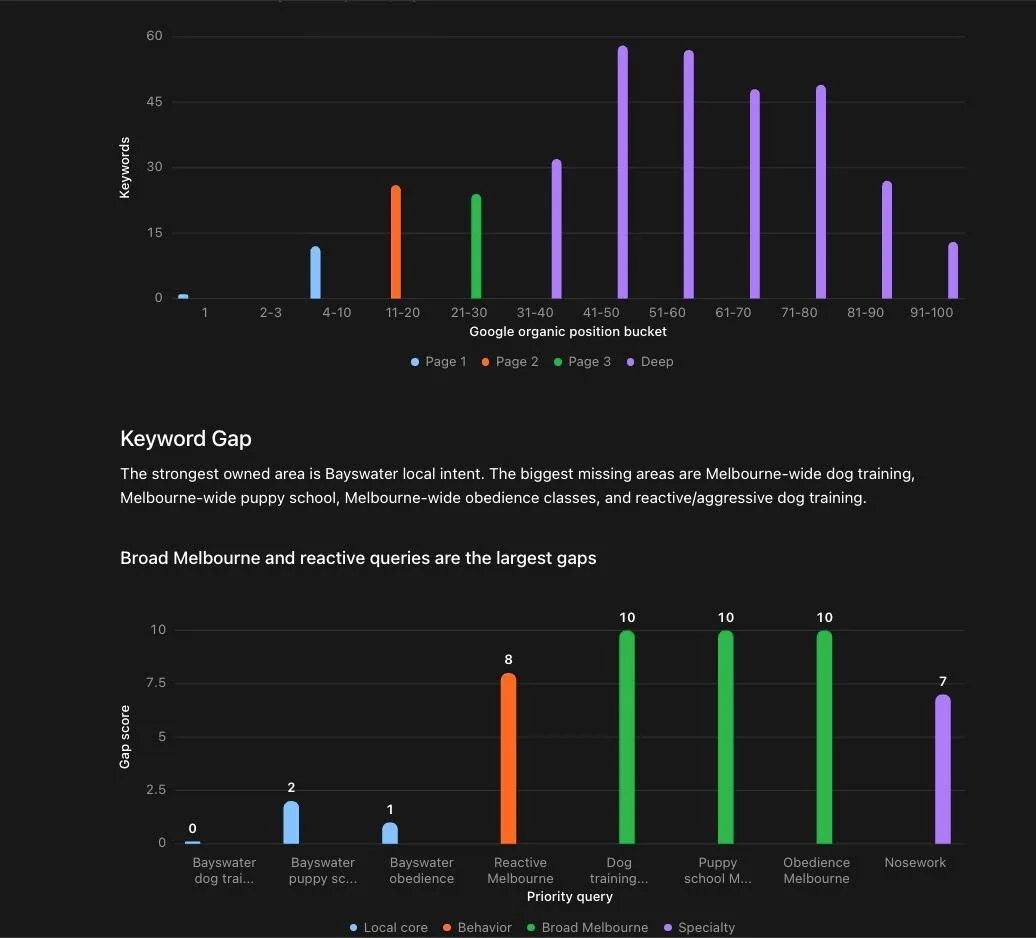
This is where the workflow gets more interesting than a normal SEO platform. A dashboard can show that a keyword is sitting on page three. Codex can look at that, understand the business, compare the page against competitors, check whether the keyword actually matters, and then draft the next action.
| Workflow | Traditional SEO tool | Codex plus DataForSEO |
|---|---|---|
| Keyword research | Filter keywords manually, export lists, build briefs yourself | Ask Codex to pull keyword data, cluster topics, map intent, and draft a page plan |
| Competitor analysis | Compare dashboards and screenshots | Ask Codex to fetch competitor pages, SERP data, backlinks, and summarize the gap |
| Technical SEO | Run a crawl and interpret issues manually | Ask Codex to combine crawl data with your codebase and propose fixes |
| AI search visibility | Often a paid add-on or separate platform | Use AI optimization data and prompts to test where your brand appears in LLM answers |
| Reporting | Build a report in the tool or export to slides | Schedule Codex to create a plain-English report and send it for review |
The biggest difference is that Codex can connect SEO research to action. If your website is in a repo, it can draft changes. If your CMS has an API, it can prepare uploads. If your workflow requires approval, it can create a review queue instead of publishing blindly.
The DataForSEO APIs that make this useful
DataForSEO is useful here because it covers the data categories most SEO workflows need, and the recent pricing/access shift makes the high-value parts more usable. Backlinks and AI search visibility used to be the areas where smaller operators could easily get priced into a full subscription stack. If those APIs are available through normal usage-based spend, Codex can become the layer that decides when the data is worth calling.
You do not need every API on day one. Start with the smallest set that answers the question in front of you.
| Data source | Use it for | Example Codex task |
|---|---|---|
| SERP API | Rank tracking, SERP features, top-ranking pages, local results | Find the top ranking pages for a keyword and explain what they have that my page lacks |
| Keyword Data API | Keyword research, volume, related topics, intent planning | Build a keyword cluster for a service page and separate commercial terms from blog terms |
| Backlinks API | Referring domains, competitor links, new and lost backlinks, link gaps | Compare my backlink profile with three competitors and list realistic outreach angles |
| On-Page API | Crawling pages and checking technical/on-page issues | Audit my top service pages and prioritize fixes that affect rankings or conversions |
| AI Optimization API | LLM responses, AI keyword data, LLM mentions, AI search benchmarking | Check whether my brand appears in AI answers for buyer-intent prompts and show the gaps |
DataForSEO's AI Optimization API docs split the AI search side into LLM Responses, LLM Scraper, AI Keyword Data, and LLM Mentions. That matters because AI SEO is not just one metric. You may want to know what an LLM says, which brands it mentions, what prompts people use, or how often a site appears.
The Backlinks API docs also show why an agent workflow is interesting. The API can return summaries, referring domains, anchors, new and lost backlinks, domain intersections, and competitor overlap. That is exactly the kind of data Codex can turn into a decision instead of another spreadsheet.
How the setup works
The video setup has three parts.
- Create a DataForSEO account and copy your API login and API password from the API access area.
- Install the SEO Decision Lab Codex repo from GitHub.
- Give Codex the DataForSEO credentials through the approved setup flow, then test one small SEO task before expanding the workflow.
I would not start by connecting everything. Start with one workflow, such as a competitor audit or keyword cluster. Once that works, add more data sources.
If you are an agency owner, this also makes the workflow much easier to productize. You can create a repeatable prompt set for each client: weekly visibility report, backlink gap check, top page decay report, new content brief, and AI answer visibility snapshot.
What I would use it for first
If I were setting this up for a business owner or freelancer, I would not start with a massive SEO command center. I would start with these five use cases.
1. A practical SEO audit
Ask Codex to audit one site using DataForSEO and produce a prioritized list of fixes. The output should separate technical issues, content issues, authority issues, and quick wins. No 80-page PDF. Just the actions worth doing.
2. Competitor gap analysis
Give Codex your domain and three competitors. Ask it to compare ranking pages, backlink profiles, content depth, and SERP intent. The useful output is not "competitor A has more keywords." The useful output is "write this page, improve this section, earn links from this type of site, and ignore this keyword because the intent is wrong."
3. AI search visibility checks
Use AI Optimization data to test prompts around your service, location, or category. The goal is to see whether ChatGPT, Claude, Gemini, or Perplexity mention your brand, your competitors, or none of you.
This is where the workflow fits with Generative Engine Optimization and LLM SEO. You are not just chasing blue links. You are checking whether your site is a good source for answer engines.
4. Content briefs that use real SERP data
Codex can pull SERP data, inspect ranking pages, and turn the result into a content brief. The human still needs to add examples, screenshots, opinions, and proof. But the boring research layer gets much faster.
If you want the content side, start with SEO content writing and how to write content that ranks in AI search. The agent should help with research and structure. It should not publish bland AI copy on its own.
5. Scheduled reports
Once the workflow is stable, schedule it. Ask Codex to run a weekly report that checks rankings, backlink movement, content decay, and AI visibility. For most businesses, that is more useful than logging into five dashboards and pretending the graphs explain themselves.
Starter prompts for Codex and DataForSEO
Use these as starting points once your DataForSEO access is connected. Keep the first run small so you can verify costs and output quality.
Competitor research prompt Use this when you want Codex to compare your site against real competitors instead of guessing from memory.
Open copy prompt
Using DataForSEO, compare my domain against these three competitors: [competitor 1], [competitor 2], [competitor 3]. Focus on organic keywords, top ranking pages, backlink gaps, and search intent. Return the 10 highest-leverage actions, with the evidence for each one.SEO audit prompt Use this when you want a practical audit split by technical SEO, content, internal links, backlinks, and AI visibility.
Open copy prompt
Audit [domain] using DataForSEO. Separate the findings into technical SEO, content, internal links, backlinks, and AI search visibility. Prioritize actions by likely impact and effort. Do not suggest changes unless the data supports them.AI search visibility prompt Use this when you want to test whether your brand shows up in ChatGPT, Claude, Gemini, or Perplexity style answers.
Open copy prompt
Use DataForSEO AI Optimization data to test whether [brand] appears for buyer-intent prompts around [service/category]. Compare mentions against [competitors]. Summarize which topics and pages could improve visibility in AI answers.Content brief prompt Use this when you want Codex to turn SERP data into a useful content brief before you write.
Open copy prompt
Research the SERP for [keyword] with DataForSEO. Identify the dominant search intent, ranking page types, common sections, missing angles, and entities. Create a content brief that includes a first-person expert angle and internal link suggestions.Where this can go wrong
This setup is powerful, but it can also create a mess if you treat it like autopilot.
- Bad credentials setup: do not paste API keys into random chats or documents. Use the plugin's intended credential flow or environment variables.
- No cost controls: DataForSEO is usage-based, which is good, but agents can run too many calls if you do not constrain them. Start small.
- Publishing without review: Codex can draft changes, but a human should approve titles, content, outreach, and CMS updates.
- Confusing data with strategy: backlinks, volumes, and AI mentions are inputs. They do not replace judgment.
- Trying to replace every tool immediately: use this where it is clearly cheaper or faster. Keep specialist tools if they still save time.
My take: this is not "Ahrefs is dead" or "Semrush is useless." That is too simplistic. The better takeaway is that expensive SEO platforms are no longer the only way to get serious SEO data. Agents make API-first SEO workflows much more accessible.
Who should use this setup?
This is a good fit if you:
- already use Codex or are comfortable working with AI agents;
- want an SEO tool that can understand your business context instead of only showing generic metrics;
- want cheaper access to SEO data without paying for a full dashboard every month;
- run SEO for your own business and need practical actions, not endless reports;
- manage clients and want repeatable audits, briefs, and reporting workflows;
- care about AI search visibility and want to test ChatGPT, Claude, Gemini, or Perplexity prompts.
It is not a good fit if you want a polished dashboard, hand-holding, or a one-click SEO tool. Codex plus DataForSEO is more flexible, but that flexibility means you need to define the workflow. Get that right and it becomes less like a report generator and more like a smart SEO analyst inside your project.
Watch the video tutorial
If you prefer to see the Codex and DataForSEO setup visually, watch the full tutorial below.
Where AI Ranking fits
This is the kind of workflow we build toward inside AI Ranking: practical SEO systems that combine data, AI tools, and human judgment. If you want the exact community resource for this setup, go to the Codex might be the best SEO tool now post inside the free AI Ranking Skool.
For deeper setup work, this also connects naturally with SEO AI agents, SEO automation, and SEO audit tools.
FAQ
Can Codex replace Ahrefs or Semrush?
For some workflows, yes. Codex plus DataForSEO can replace parts of keyword research, competitor research, backlink analysis, SEO audits, and reporting. It will not feel like a normal dashboard, and it will not be right for everyone.
Is DataForSEO cheaper than Ahrefs or Semrush?
It can be cheaper because DataForSEO uses a pay-for-what-you-use API model. But the final cost depends on how many API calls you run, which endpoints you use, and whether you need backlink or AI optimization data. Set limits and test small first.
What is the biggest advantage of using Codex for SEO?
The advantage is that Codex can turn data into a workflow and understand business context while it does it. It can pull data, compare pages, draft briefs, inspect a website repo, prepare updates, and create reports. That is different from staring at dashboards and exporting CSV files.
Should I let Codex publish SEO changes automatically?
No. Let Codex draft, analyze, and prepare changes. Keep a human approval step before publishing content, changing important pages, sending outreach, or editing live website code.
What should I connect first?
Start with one use case. For most people, that should be either a competitor analysis, a content brief, or a simple SEO audit. Once the output is useful and the costs are predictable, add more workflows.